> ## Documentation Index
> Fetch the complete documentation index at: https://docs.getpara.com/llms.txt
> Use this file to discover all available pages before exploring further.
# Developer Portal Security Settings
> Configure authentication methods, session management, and transaction permissions
export const DeveloperPortalNextSteps = ({basePath, current, implementationHref, implementationTitle = "Implementation Guide", implementationDescription = "Continue with your selected integration path."}) => {
const pages = [{
id: "setup",
title: "Portal Setup",
description: "Configure API keys, environments, networks, domains, and email settings.",
slug: "developer-portal-setup"
}, {
id: "email",
title: "Email Branding",
description: "Customize Welcome and OTP emails with your brand colors, fonts, and logos.",
slug: "developer-portal-email-branding"
}, {
id: "payments",
title: "Payment Integration",
description: "Configure payment providers and transaction features for crypto onramps and offramps.",
slug: "developer-portal-payments"
}, {
id: "security",
title: "Security Settings",
description: "Configure authentication methods, session management, and transaction permissions.",
slug: "developer-portal-security"
}];
return <>
Next Steps
{pages.filter(page => page.id !== current).map(page => )}
{implementationHref && }
;
};
Configure security settings to control user authentication methods, session duration, and transaction permissions. These settings balance security with user experience for your Para integration.
## Authentication Methods
Configure which authentication methods your users can use to access their wallets.
This configuration does not affect Mobile SDK frameworks. Mobile SDKs use native mobile passkeys with an option to use passwords via Webviews.
 ### One Click Login
**Available since Alpha 2.0 v68**
The most seamless authentication experience for users:
* **Instant Wallets**: Create a real, non-custodial wallet the moment a user inputs their email or social login
* **Fast Performance**: Wallets created in seconds
* **Progressive Onboarding**: Passkeys or other auth can be enforced later
### Passkeys
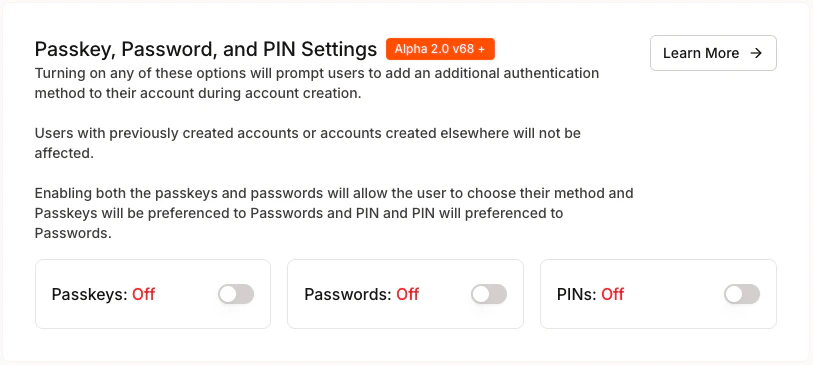
Enable passkey authentication for enhanced security and user experience:
* **Biometric Authentication**: Fingerprint, Face ID, or Windows Hello
* **Hardware Security Keys**: FIDO2-compatible security keys
* **Platform Authenticators**: Built-in device authenticators
### Passwords
Configure traditional password authentication:
* **Password Requirements**: Set complexity requirements
* **Recovery Options**: Enable password reset functionality
* **Multi-Factor Authentication**: Optional additional security layer
### PINs
Enable simple PIN-based authentication for quick access:
* **4 Digit Codes:** Users can create a short numeric code, familiar from mobile banking and device unlock screens
* **Flexibility:** Allow PINs as the primary method or alongside passkey/passwords so users can choose whatever feels easiest
* **Legacy Devices:** Provides a lightweight option on devices that don't support passkeys
You can enable both passkeys and passwords to give users choice:
* **Passkeys Preferred**: Passkeys will be suggested first during registration
* **Fallback Support**: Users can choose passwords if passkeys aren't available
If you're creating a PWA we recommend using passwords so that the user stays within the installed app. Passkeys will open a new browser tab.
## Session Management
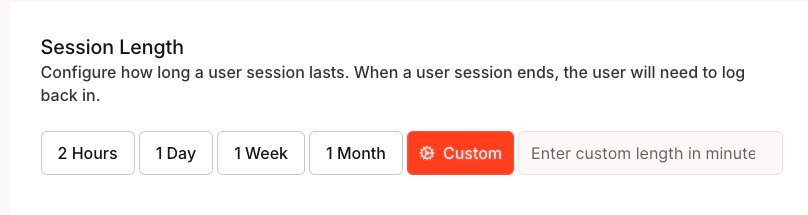
Control how long users stay authenticated before requiring re-authentication.
### One Click Login
**Available since Alpha 2.0 v68**
The most seamless authentication experience for users:
* **Instant Wallets**: Create a real, non-custodial wallet the moment a user inputs their email or social login
* **Fast Performance**: Wallets created in seconds
* **Progressive Onboarding**: Passkeys or other auth can be enforced later
### Passkeys
Enable passkey authentication for enhanced security and user experience:
* **Biometric Authentication**: Fingerprint, Face ID, or Windows Hello
* **Hardware Security Keys**: FIDO2-compatible security keys
* **Platform Authenticators**: Built-in device authenticators
### Passwords
Configure traditional password authentication:
* **Password Requirements**: Set complexity requirements
* **Recovery Options**: Enable password reset functionality
* **Multi-Factor Authentication**: Optional additional security layer
### PINs
Enable simple PIN-based authentication for quick access:
* **4 Digit Codes:** Users can create a short numeric code, familiar from mobile banking and device unlock screens
* **Flexibility:** Allow PINs as the primary method or alongside passkey/passwords so users can choose whatever feels easiest
* **Legacy Devices:** Provides a lightweight option on devices that don't support passkeys
You can enable both passkeys and passwords to give users choice:
* **Passkeys Preferred**: Passkeys will be suggested first during registration
* **Fallback Support**: Users can choose passwords if passkeys aren't available
If you're creating a PWA we recommend using passwords so that the user stays within the installed app. Passkeys will open a new browser tab.
## Session Management
Control how long users stay authenticated before requiring re-authentication.
 ### Security Considerations
**Shorter Sessions (2 Hours - 1 Day):**
* Enhanced security for sensitive applications
* Reduced risk if device is compromised
* Better for shared or public devices
**Longer Sessions (1 Week - 1 Month):**
* Improved user experience with fewer logins
* Better for personal devices and trusted environments
* Consider implementing automatic session refresh
### Custom Session Length
For custom durations:
1. Select "Custom" option
2. Enter duration in minutes
3. Consider your application's specific security needs
4. Balance security with user experience
After configuring session length, continue to the Manage Sessions section for the SDK path you are using.
## Transaction Permissions
Configure how users confirm transactions and manage permissions.
### Security Considerations
**Shorter Sessions (2 Hours - 1 Day):**
* Enhanced security for sensitive applications
* Reduced risk if device is compromised
* Better for shared or public devices
**Longer Sessions (1 Week - 1 Month):**
* Improved user experience with fewer logins
* Better for personal devices and trusted environments
* Consider implementing automatic session refresh
### Custom Session Length
For custom durations:
1. Select "Custom" option
2. Enter duration in minutes
3. Consider your application's specific security needs
4. Balance security with user experience
After configuring session length, continue to the Manage Sessions section for the SDK path you are using.
## Transaction Permissions
Configure how users confirm transactions and manage permissions.
 ### Transaction Pop-ups
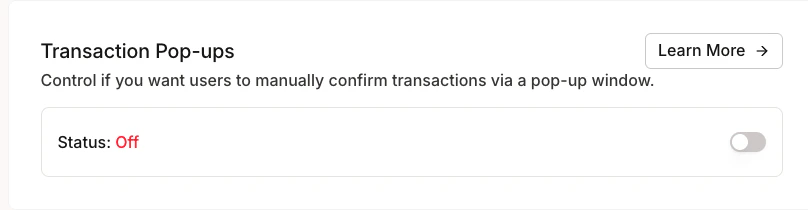
Control whether users see confirmation dialogs for transactions:
* **Enabled**: Users manually confirm each transaction via popup
* **Disabled**: Transactions proceed without additional confirmation
By default, transaction pop-ups are disabled to allow faster transaction signing. We recommend adding careful transaction validation in your application logic to ensure users are aware of the transactions they are signing.
### Transaction Pop-ups
Control whether users see confirmation dialogs for transactions:
* **Enabled**: Users manually confirm each transaction via popup
* **Disabled**: Transactions proceed without additional confirmation
By default, transaction pop-ups are disabled to allow faster transaction signing. We recommend adding careful transaction validation in your application logic to ensure users are aware of the transactions they are signing.