;
};
export const Link = ({href, label, newTab = false}) => {
const [isHovered, setIsHovered] = useState(false);
return setIsHovered(true)} onMouseLeave={() => setIsHovered(false)}>
{label}
;
};
Para webhooks send real-time HTTP POST requests to your server when events occur in your integration — such as a user
signing up, a wallet being created, or a transaction being signed. Use webhooks to trigger backend workflows, sync data,
or send notifications without polling.
## Configure Webhooks
Set up webhooks from your API key's **Webhooks** page in the .
### Set Your Endpoint URL
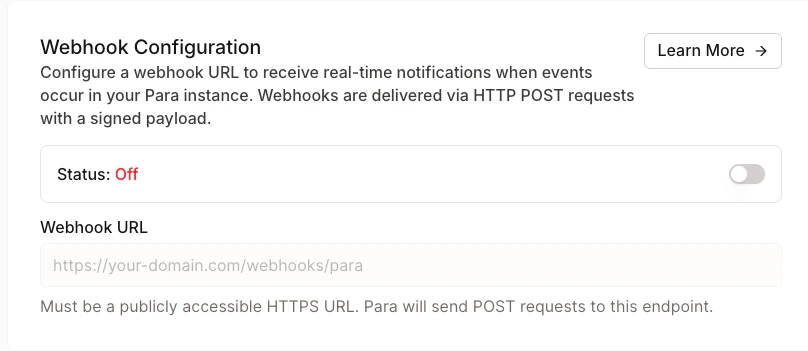
Enable the webhook toggle and enter your HTTPS endpoint URL. Para will send POST requests to this URL when subscribed
events occur.
Only HTTPS URLs are accepted. HTTP endpoints will be rejected.
### Select Events
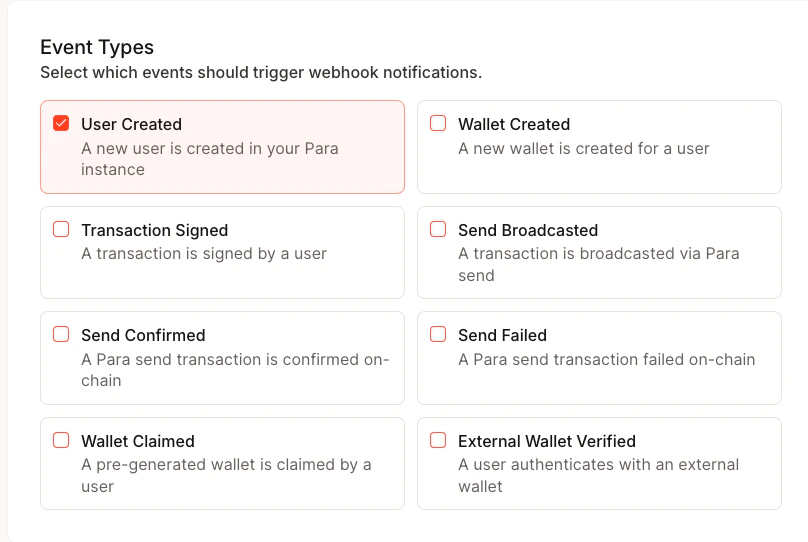
Choose which events you want to receive. You must select at least one event type when webhooks are enabled.
### Save and Copy Your Secret
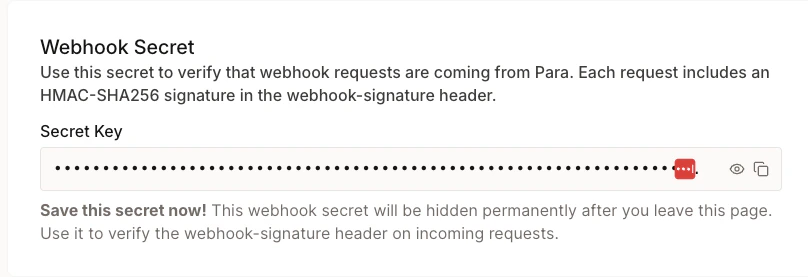
When you first save your webhook configuration, Para generates a signing secret (prefixed with `whsec_`). This secret is
**displayed only once** — copy and store it securely. You'll use it to
[verify webhook signatures](#verify-webhook-signatures).
Your webhook secret is shown only at creation and after rotation. If you lose it, you'll need to rotate to get a new
one.
### Test Your Endpoint
Click **Test Webhook** to send a `test.ping` event to your endpoint. This verifies connectivity without triggering a
real event.
## Event Types
| Event | Description |
| ------------------------------- | --------------------------------------------------------------------------------- |
| `user.created` | A new user was created |
| `wallet.created` | A new wallet was created for a user |
| `transaction.signed` | A transaction was signed |
| `send.broadcasted` | A Para Send transaction was broadcasted to the network |
| `send.confirmed` | A Para Send transaction was confirmed on-chain |
| `send.failed` | A Para Send transaction failed |
| `rest.transaction.confirmed` | A REST API v1 broadcast transaction was confirmed on-chain |
| `rest.transaction.failed` | A REST API v1 broadcast transaction reverted on-chain or failed during monitoring |
| `wallet.pregen_claimed` | A pre-generated wallet was claimed by a user |
| `user.external_wallet_verified` | A user verified an external wallet |
## Event Payload
Every webhook request contains a JSON body with a standard envelope wrapping the event-specific data:
```json theme={null}
{
"id": "evt_550e8400-e29b-41d4-a716-446655440000",
"type": "user.created",
"createdAt": "2026-02-07T12:00:00.000Z",
"data": {
// event-specific fields
}
}
```
| Field | Description |
| ----------- | ------------------------------------------------ |
| `id` | Unique event ID prefixed with `evt_` |
| `type` | The event type string |
| `createdAt` | ISO 8601 timestamp of when the event was created |
| `data` | Event-specific payload (see below) |
### Event Data by Type
```json theme={null}
{
"userId": "d5358219-38d3-4650-91a8-e338131d1c5e",
"userCreatedAt": "2026-02-07T12:00:00.000Z"
}
```
```json theme={null}
{
"userId": "d5358219-38d3-4650-91a8-e338131d1c5e",
"walletId": "de4034f1-6b0f-4a98-87a5-e459db4d3a03",
"walletAddress": "0x9dd3824f045c77bc369485e8f1dd6b452b6be617",
"walletType": "EVM",
"walletCreatedAt": "2026-02-07T12:00:00.000Z"
}
```
```json theme={null}
{
"userId": "d5358219-38d3-4650-91a8-e338131d1c5e",
"walletId": "de4034f1-6b0f-4a98-87a5-e459db4d3a03",
"walletAddress": "0x9dd3824f045c77bc369485e8f1dd6b452b6be617",
"chainId": 1,
"signedAt": "2026-02-07T12:00:00.000Z"
}
```
The `chainId` field is `null` for message signing operations where no chain is involved.
```json theme={null}
{
"userId": "d5358219-38d3-4650-91a8-e338131d1c5e",
"walletId": "de4034f1-6b0f-4a98-87a5-e459db4d3a03",
"txHash": "0xabc123...",
"type": "EVM",
"evmChainId": "1",
"isDevnet": false,
"broadcastedAt": "2026-02-07T12:00:00.000Z"
}
```
For Solana transactions, `type` will be `"SOLANA"` and `evmChainId` will be absent. `isDevnet` indicates if the transaction was on a devnet.
```json theme={null}
{
"userId": "d5358219-38d3-4650-91a8-e338131d1c5e",
"walletId": "de4034f1-6b0f-4a98-87a5-e459db4d3a03",
"txHash": "0xabc123...",
"type": "EVM",
"evmChainId": "1",
"isDevnet": false,
"confirmedAt": "2026-02-07T12:00:00.000Z"
}
```
```json theme={null}
{
"userId": "d5358219-38d3-4650-91a8-e338131d1c5e",
"walletId": "de4034f1-6b0f-4a98-87a5-e459db4d3a03",
"txHash": "0xabc123...",
"type": "EVM",
"evmChainId": "1",
"isDevnet": false,
"error": "insufficient funds",
"failedAt": "2026-02-07T12:00:00.000Z"
}
```
The `error` field is optional and may be absent if no error message was available.
```json theme={null}
{
"transactionId": "550e8400-e29b-41d4-a716-446655440000",
"walletId": "de4034f1-6b0f-4a98-87a5-e459db4d3a03",
"partnerId": "11111111-2222-3333-4444-555555555555",
"intentKind": "transfer",
"type": "EVM",
"hash": "0x1234abcd...",
"blockNumber": "5127103",
"blockHash": "0xdeadbeef...",
"resolvedAt": "2026-02-07T12:00:00.000Z"
}
```
`transactionId` matches the id returned from `POST /v1/wallets/:walletId/transfer` or
`POST /v1/wallets/:walletId/sign-transaction` with `broadcast: true` and used
by `GET /v1/wallets/:walletId/transactions/:transactionId`.
`intentKind` is `transfer` or `sign_transaction`.
```json theme={null}
{
"transactionId": "550e8400-e29b-41d4-a716-446655440000",
"walletId": "de4034f1-6b0f-4a98-87a5-e459db4d3a03",
"partnerId": "11111111-2222-3333-4444-555555555555",
"intentKind": "transfer",
"type": "EVM",
"status": "reverted",
"hash": "0x1234abcd...",
"failureMessage": "execution reverted",
"resolvedAt": "2026-02-07T12:00:00.000Z"
}
```
`status` is `reverted` (execution failed on-chain) or `failed` (never broadcast, rejected by the RPC, or the monitor gave up).
When `status = failed`, the payload also includes `failureStage` (`mpc_sign`, `signature_apply`,
`signer_verify`, `broadcast`, or `monitor_timeout`) and an optional `failureCode` from the broadcast helper.
```json theme={null}
{
"userId": "d5358219-38d3-4650-91a8-e338131d1c5e",
"walletId": "de4034f1-6b0f-4a98-87a5-e459db4d3a03",
"walletAddress": "0x9dd3824f045c77bc369485e8f1dd6b452b6be617",
"walletType": "EVM",
"claimedAt": "2026-02-07T12:00:00.000Z"
}
```
```json theme={null}
{
"userId": "d5358219-38d3-4650-91a8-e338131d1c5e",
"walletAddress": "0xaD6b78193b78e23F9aBBB675734f4a2B3559598D",
"walletProvider": "MetaMask",
"verifiedAt": "2026-02-07T12:00:00.000Z"
}
```
The `walletProvider` field is optional and may be absent depending on how the wallet was connected.
## Verify Webhook Signatures
Every webhook request includes headers that let you verify the request came from Para:
| Header | Description |
| ------------------- | --------------------------------------------------- |
| `webhook-id` | Unique event ID (matches payload `id`) |
| `webhook-timestamp` | Unix timestamp in seconds when the request was sent |
| `webhook-signature` | HMAC-SHA256 signature prefixed with `v1,` |
To verify a webhook:
1. Construct the signed message: `{webhook-timestamp}.{raw request body}`
2. Compute `HMAC-SHA256` using your webhook secret as the key
3. Base64-encode the result and compare it to the signature after the `v1,` prefix
```typescript Node.js theme={null}
import crypto from "crypto";
function verifyWebhookSignature(
payload: string,
headers: Record,
secret: string
): boolean {
const timestamp = headers["webhook-timestamp"];
const signature = headers["webhook-signature"];
if (!timestamp || !signature) return false;
// Reject requests older than 5 minutes
const now = Math.floor(Date.now() / 1000);
if (Math.abs(now - parseInt(timestamp)) > 300) return false;
const message = `${timestamp}.${payload}`;
const expected = crypto
.createHmac("sha256", secret)
.update(message)
.digest("base64");
// During secret rotation, multiple signatures may be
// space-delimited (one per active secret). Try each.
const signatures = signature.split(" ");
return signatures.some((sig) => {
const received = sig.replace("v1,", "");
return crypto.timingSafeEqual(
Buffer.from(expected),
Buffer.from(received)
);
});
}
// Usage in an Express handler
app.post("/webhook", (req, res) => {
const rawBody = req.body; // use raw body string, not parsed JSON
const isValid = verifyWebhookSignature(
rawBody,
req.headers,
process.env.WEBHOOK_SECRET
);
if (!isValid) {
return res.status(401).send("Invalid signature");
}
const event = JSON.parse(rawBody);
switch (event.type) {
case "user.created":
// handle user creation
break;
case "wallet.created":
// handle wallet creation
break;
// ...
}
res.status(200).send("OK");
});
```
```python Python theme={null}
import hmac
import hashlib
import base64
import time
import json
def verify_webhook_signature(payload: str, headers: dict, secret: str) -> bool:
timestamp = headers.get("webhook-timestamp", "")
signature = headers.get("webhook-signature", "")
if not timestamp or not signature:
return False
# Reject requests older than 5 minutes
if abs(time.time() - int(timestamp)) > 300:
return False
message = f"{timestamp}.{payload}"
expected = base64.b64encode(
hmac.new(secret.encode(), message.encode(), hashlib.sha256).digest()
).decode()
# During secret rotation, multiple signatures may be
# space-delimited (one per active secret). Try each.
signatures = signature.split(" ")
return any(
hmac.compare_digest(expected, sig.replace("v1,", ""))
for sig in signatures
)
# Usage in a Flask handler
@app.route("/webhook", methods=["POST"])
def webhook():
raw_body = request.get_data(as_text=True)
is_valid = verify_webhook_signature(
raw_body,
request.headers,
os.environ["WEBHOOK_SECRET"],
)
if not is_valid:
return "Invalid signature", 401
event = json.loads(raw_body)
if event["type"] == "user.created":
pass # handle user creation
elif event["type"] == "wallet.created":
pass # handle wallet creation
return "OK", 200
```
Always use the raw request body string for verification — not a re-serialized JSON object. Re-serialization can change
formatting and break the signature check.
## Manage Your Webhook
### Rotate Secret
If your secret is compromised or you need a new one, rotate it from the **Danger Zone** section of the Webhooks page.
The previous secret remains valid for 24 hours to give you time to update your server. A new secret is displayed once.
### Disable or Delete
Toggle webhooks off to temporarily stop delivery without losing your configuration. To remove the webhook entirely, use
the **Delete Webhook** button — this removes the URL, events, and secret permanently.
## Best Practices
* **Respond quickly**: Return a `2xx` status within a few seconds. Offload heavy processing to a background job.
* **Verify signatures**: Always validate the `webhook-signature` header before trusting the payload.
* **Check timestamps**: Reject webhooks with timestamps more than 5 minutes old to prevent replay attacks.
* **Handle duplicates**: Use the `webhook-id` header to deduplicate events in case of retries.
* **Use HTTPS**: Your endpoint must be HTTPS. Para rejects HTTP URLs.

 ### Save and Copy Your Secret
When you first save your webhook configuration, Para generates a signing secret (prefixed with `whsec_`). This secret is
**displayed only once** — copy and store it securely. You'll use it to
[verify webhook signatures](#verify-webhook-signatures).
### Save and Copy Your Secret
When you first save your webhook configuration, Para generates a signing secret (prefixed with `whsec_`). This secret is
**displayed only once** — copy and store it securely. You'll use it to
[verify webhook signatures](#verify-webhook-signatures).
 ### Disable or Delete
Toggle webhooks off to temporarily stop delivery without losing your configuration. To remove the webhook entirely, use
the **Delete Webhook** button — this removes the URL, events, and secret permanently.
## Best Practices
* **Respond quickly**: Return a `2xx` status within a few seconds. Offload heavy processing to a background job.
* **Verify signatures**: Always validate the `webhook-signature` header before trusting the payload.
* **Check timestamps**: Reject webhooks with timestamps more than 5 minutes old to prevent replay attacks.
* **Handle duplicates**: Use the `webhook-id` header to deduplicate events in case of retries.
* **Use HTTPS**: Your endpoint must be HTTPS. Para rejects HTTP URLs.
### Disable or Delete
Toggle webhooks off to temporarily stop delivery without losing your configuration. To remove the webhook entirely, use
the **Delete Webhook** button — this removes the URL, events, and secret permanently.
## Best Practices
* **Respond quickly**: Return a `2xx` status within a few seconds. Offload heavy processing to a background job.
* **Verify signatures**: Always validate the `webhook-signature` header before trusting the payload.
* **Check timestamps**: Reject webhooks with timestamps more than 5 minutes old to prevent replay attacks.
* **Handle duplicates**: Use the `webhook-id` header to deduplicate events in case of retries.
* **Use HTTPS**: Your endpoint must be HTTPS. Para rejects HTTP URLs.