> ## Documentation Index
> Fetch the complete documentation index at: https://docs.getpara.com/llms.txt
> Use this file to discover all available pages before exploring further.
# Adjustable parameters
> Let users set personal limits and let managers change approval settings from a React Native app
export const PermissionsCards = ({basePath, pages, cols = 2, horizontal = false}) => {
const ImageCard = Card;
const hrefOverrides = {
"/v3/react/guides/permissions": {
"conditional-approvals": "/v3/react/guides/conditional-approvals"
},
"/v3/rest/permissions": {
"backend": "/v3/rest/permissions-administration"
}
};
const guardrailBases = ["/v3/rest/permissions", "/v3/server/guides/permissions"];
const ownership = guardrailBases.includes(basePath) ? 'guardrail' : 'request';
const overviewImages = {
"/v3/rest/permissions": {
"imgUrl": "/images/v3/cards/rest-guardrails.png",
"horizontalImgUrl": "/images/v3/cards/rest-guardrails-horizontal.png"
},
"/v3/server/guides/permissions": {
"imgUrl": "/images/v3/cards/sdk-server-guardrail-signing.png",
"horizontalImgUrl": "/images/v3/cards/sdk-server-guardrail-signing-horizontal.png"
},
"/v3/react/guides/permissions": {
"imgUrl": "/images/v3/cards/sdk-get-policy-consent-url.png",
"horizontalImgUrl": "/images/v3/cards/sdk-get-policy-consent-url-horizontal.png"
},
"/v3/react-native/guides/permissions": {
"imgUrl": "/images/v3/cards/sdk-get-policy-consent-url.png",
"horizontalImgUrl": "/images/v3/cards/sdk-get-policy-consent-url-horizontal.png"
}
};
const registry = {
overview: {
title: "Permissions overview",
description: "Return to the start of the Permissions path.",
...overviewImages[basePath]
},
"developer-portal": {
title: "Create policies in the Developer Portal",
description: "Build a policy with the Portal forms and activate it on a beta key.",
imgUrl: "/images/v3/cards/developer-portal-policy-form.png",
horizontalImgUrl: "/images/v3/cards/developer-portal-policy-form-horizontal.png"
},
"json": {
title: "Write policy JSON",
description: "Move to JSON for policies the forms cannot express.",
imgUrl: "/images/v3/cards/developer-portal-policy-json.png",
horizontalImgUrl: "/images/v3/cards/developer-portal-policy-json-horizontal.png"
},
"testing": {
title: "Test your policies",
description: "Exercise every rule on beta before you ship.",
imgUrl: "/images/v3/cards/concept-policy-testing.png",
horizontalImgUrl: "/images/v3/cards/concept-policy-testing-horizontal.png"
},
"production": {
title: "Go to production",
description: "Request a production review and publish your policy.",
imgUrl: "/images/v3/cards/concept-policy-publication.png",
horizontalImgUrl: "/images/v3/cards/concept-policy-publication-horizontal.png"
},
"conditional-approvals": {
title: "Conditional approvals",
description: "Require people to approve a request before it signs.",
imgUrl: "/images/v3/cards/portal-conditional-approval-case.png",
horizontalImgUrl: "/images/v3/cards/portal-conditional-approval-case-horizontal.png"
},
"approval-signatures": {
title: "Collect approval signatures",
description: "Collect signatures from approvers for multisig workflows.",
imgUrl: "/images/v3/cards/sdk-get-approval-signatures.png",
horizontalImgUrl: "/images/v3/cards/sdk-get-approval-signatures-horizontal.png"
},
"adjustable-parameters": {
title: "Adjustable parameters",
description: "Let users set their own limits and managers adjust approval settings.",
imgUrl: "/images/v3/cards/portal-user-policy-limits.png",
horizontalImgUrl: "/images/v3/cards/portal-user-policy-limits-horizontal.png"
},
"lifecycle": {
title: "Manage the policy lifecycle",
description: "Version, activate, replace and retire policies.",
imgUrl: "/images/v3/cards/developer-portal-policy-versions.png",
horizontalImgUrl: "/images/v3/cards/developer-portal-policy-versions-horizontal.png"
},
"backend": {
title: "Manage permissions from your backend",
description: "Assign approvers and read policy state with your server secret.",
imgUrl: "/images/v3/cards/rest-permissions-administration.png",
horizontalImgUrl: "/images/v3/cards/rest-permissions-administration-horizontal.png"
},
templates: ownership === "guardrail" ? {
title: "Guardrail templates",
description: "Start from a tested Guardrail policy.",
imgUrl: "/images/v3/cards/concept-guardrail-templates.png",
horizontalImgUrl: "/images/v3/cards/concept-guardrail-templates-horizontal.png"
} : {
title: "Request templates",
description: "Start from a tested Request policy.",
imgUrl: "/images/v3/cards/concept-request-templates.png",
horizontalImgUrl: "/images/v3/cards/concept-request-templates-horizontal.png"
},
"guardrail:templates/spending-caps": {
title: "Spending caps",
description: "Cap native and token transfers per transaction or per day.",
imgUrl: "/images/v3/cards/concept-spending-limits.png",
horizontalImgUrl: "/images/v3/cards/concept-spending-limits-horizontal.png"
},
"guardrail:templates/allowlists": {
title: "Recipient and contract allowlists",
description: "Limit transfers and contract calls to addresses you know.",
imgUrl: "/images/v3/cards/concept-recipient-allowlists.png",
horizontalImgUrl: "/images/v3/cards/concept-recipient-allowlists-horizontal.png"
},
"guardrail:templates/approval-tiers": {
title: "Approval thresholds and tiers",
description: "Hold large transfers for approval, or deny the largest.",
imgUrl: "/images/v3/cards/concept-approval-tiers.png",
horizontalImgUrl: "/images/v3/cards/concept-approval-tiers-horizontal.png"
},
"guardrail:templates/treasury": {
title: "Treasury approvals",
description: "Deny unplanned actions and approve wallet or Safe payouts in stages.",
imgUrl: "/images/v3/cards/concept-treasury-approvals.png",
horizontalImgUrl: "/images/v3/cards/concept-treasury-approvals-horizontal.png"
},
"guardrail:templates/message-signing": {
title: "Message and raw signing",
description: "Block or hold raw signatures, and block permits.",
imgUrl: "/images/v3/cards/concept-signing-actions.png",
horizontalImgUrl: "/images/v3/cards/concept-signing-actions-horizontal.png"
},
"request:templates/allowances": {
title: "Transfer allowances",
description: "Let small transfers and a daily budget sign without a prompt.",
imgUrl: "/images/v3/cards/concept-spending-limits.png",
horizontalImgUrl: "/images/v3/cards/concept-spending-limits-horizontal.png"
},
"request:templates/recipients-and-contracts": {
title: "Known recipients and app contracts",
description: "Cover transfers to known addresses and your contract's calls.",
imgUrl: "/images/v3/cards/concept-recipient-allowlists.png",
horizontalImgUrl: "/images/v3/cards/concept-recipient-allowlists-horizontal.png"
},
"request:templates/cosigner-approval": {
title: "Co-signer approval",
description: "Send large transfers to a co-signer for approval.",
imgUrl: "/images/v3/cards/portal-conditional-approval-case.png",
horizontalImgUrl: "/images/v3/cards/portal-conditional-approval-case-horizontal.png"
},
"request:templates/adjustable-limits": {
title: "User-adjustable limits",
description: "Let each user choose their own spending limits.",
imgUrl: "/images/v3/cards/portal-user-policy-limits.png",
horizontalImgUrl: "/images/v3/cards/portal-user-policy-limits-horizontal.png"
},
"request:templates/message-signing": {
title: "Message signing",
description: "Sign messages from users' wallets without a prompt.",
imgUrl: "/images/v3/cards/concept-signing-actions.png",
horizontalImgUrl: "/images/v3/cards/concept-signing-actions-horizontal.png"
}
};
const entryFor = slug => registry[slug] || registry[`${ownership}:${slug}`];
const hrefFor = slug => {
if (slug === 'overview') return basePath;
const overrides = hrefOverrides[basePath] || ({});
return overrides[slug] || `${basePath}/${slug}`;
};
return
{pages.map(slug => {
const entry = entryFor(slug);
return ;
})}
;
};
export const Card = ({imgUrl, compactImgUrl, title, description, href, horizontal = false, newTab = false}) => {
const [isHovered, setIsHovered] = useState(false);
const handleClick = e => {
e.preventDefault();
if (newTab) {
window.open(href, '_blank', 'noopener,noreferrer');
} else {
window.location.href = href;
}
};
return ;
};
In a React Native app, users manage their own personal limits, and configuration managers change approval settings from their own session. The hooks listed below and `PermissionsV2ApprovalCasesAffectedError` ship in `@getpara/react-native-wallet`, so import them from there. When a user must consent again after saving, open the link from `getPolicyConsentUrl` with your in-app browser.
Let people tune parts of a published policy without a new version. Para supports two kinds of adjustment: personal limits, which each user sets on a Request policy, and adjustable approval settings, which your backend or a configuration manager sets on an approval requirement.
Declare both kinds in the policy JSON, test them with a **Development** key on Para's beta environment, and publish the policy to production through a production review. Values that users and managers save belong to the environment where they save them.
| | Personal limits | Adjustable approval settings |
| - | - | - |
| Declared with | `parameter` on a condition | `safeKnobs` on an `approvalRequirement` |
| Policy type | Request | Guardrail or Request |
| Set by | Each user, for their own wallet | Your backend, or configuration managers |
| Applies to | That user's requests | Every case for the requirement in one authorization scope |
## Personal limits
A personal limit lets each user pick their own value for an amount in a Request, such as a daily spending cap. Your policy supplies the default, and Para applies the user's value only to that user's requests.
Personal limits must be turned on for your app. Until they are, saving a policy with a `parameter` fails with `permissions_v2_extension_unavailable`. Contact Para if you get that code.
### Declare a parameter
Add `parameter: { id, label }` to a `compare` or `aggregate` condition. The condition's `value` becomes the default.
```json theme={null}
{
"id": "daily-eth-allowance",
"effect": "allow",
"actions": ["transfer_native"],
"when": {
"kind": "aggregate",
"fact": "wallet.spend.native",
"op": "lte",
"value": "1000000000000000000",
"window": "24h",
"parameter": { "id": "daily-eth", "label": "Daily ETH limit" }
}
}
```
* `compare` conditions can use `request.value.baseUnits` or `request.token.value.baseUnits`. `aggregate` conditions can use any metered spend fact, such as `wallet.spend.native` or `safe.spend.native`.
* `allow` rules use `lt` or `lte`. `require_approval` rules use `gt` or `gte`.
* A parameter cannot sit inside `not`, and each `id` must be unique in the policy.
* Values are amounts in base units, written as integer strings without leading zeros.
Para does not bound personal values. A user can save any amount, including one higher than your default. Use a parameter only where any value the user chooses is acceptable to you.
A Guardrail can also carry a `parameter`, but no user can change it, so Para always enforces the default.
### How users set their limits
The Portal consent screen shows an input for each parameter, labelled with the parameter's `label`, with the default as its placeholder and a **base units** suffix. Values the user enters there are saved with their consent.
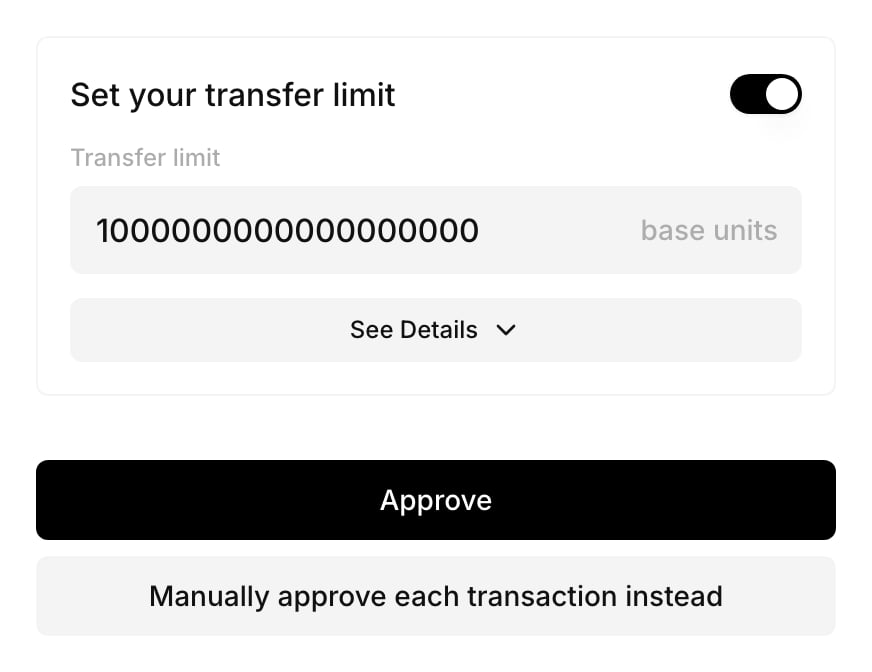 To build your own settings screen, use the SDK.
### Read and update limits from the SDK
`getUserPolicyParameters(policyId)` returns the user's current values together with the parameters the policy declares. Pass its `policyVersion`, `policyHash` and `revision` back when you save:
```ts theme={null}
const settings = await para.getUserPolicyParameters(policyId);
if (settings.status === "ready") {
await para.updateUserPolicyParameters(policyId, {
policyVersion: settings.policyVersion,
policyHash: settings.policyHash,
expectedRevision: settings.revision,
values: { "daily-eth": "500000000000000000" },
});
}
```
| Method | Hook | Use |
| - | - | - |
| `listUserAdjustablePolicies()` | `useUserAdjustablePolicies` | Policies where the user can set limits |
| `getUserPolicyParameters(policyId)` | `useUserPolicyParameters` | Current values, defaults and status |
| `updateUserPolicyParameters(policyId, body)` | `useUpdateUserPolicyParameters` | Save values |
| `resetUserPolicyParameters(policyId, body)` | `useResetUserPolicyParameters` | Return to the defaults |
| `listUserPolicyParameterHistory(policyId, { beforeRevision })` | `useUserPolicyParameterHistory` | Earlier revisions |
The two mutation hooks take `{ policyId, body }`. A reset body has the same fields as a save, without `values`.
How saved values behave:
* Each save replaces the user's values. A parameter you leave out of `values` falls back to the default, so send every value the user wants to keep. Unknown IDs are rejected.
* Saving sets `provenance` to `personal`, and a reset sets it to `default`. Each save or reset adds a revision, except one that changes neither the values nor the `provenance`, such as saving the same values again. A stale `expectedRevision` returns `409` with `user parameter revision changed; reload settings`.
* Consent covers the exact values. After a save or reset, the user consents again before the policy applies to them, for example through `getPolicyConsentUrl({ walletId, policyId })`.
* When you publish a new version of the policy, the view returns `status: "needs_confirmation"` with the old values in `previousValues`. Until the user saves or resets for the new version, Para leaves the policy out for that user and fails closed.
Your backend can read limits but not change them. The REST SDK offers `listUserAdjustablePolicies(userId)`, `getUserPolicyParameters(userId, policyId)` and `listUserPolicyParameterHistory(userId, policyId)`.
## Adjustable approval settings
Adjustable approval settings let your organization change parts of an approval requirement without publishing a new policy version. The policy declares which settings can change and within what limits. In policy JSON they are called `safeKnobs`.
### Declare the settings
Add `safeKnobs` to the `approvalRequirement`. To let people other than your backend change them, add `configurationManagerEligibility`:
```json theme={null}
"approvalRequirement": {
"id": "treasury-review",
"amountFact": "request.value.baseUnits",
"configurationManagerEligibility": [{ "kind": "role", "name": "treasury-admin" }],
"stages": [
{ "id": "finance", "requiredApprovals": 2, "eligibility": [{ "kind": "role", "name": "finance" }] },
{ "id": "executive", "requiredApprovals": 1, "eligibility": [{ "kind": "role", "name": "cfo" }], "minimumAmount": "10000000000000000000" }
],
"safeKnobs": [
{ "id": "finance-approvals", "kind": "required_approvals", "stageId": "finance", "min": 1, "max": 3 },
{
"id": "executive-threshold",
"kind": "minimum_amount",
"stageId": "executive",
"min": "5000000000000000000",
"max": "50000000000000000000"
}
]
}
```
| `kind` | Fields | Value you save |
| - | - | - |
| `required_approvals` | `stageId`, `min`, `max` (1 to 25) | An integer from `min` to `max`. The stage's own `requiredApprovals` must be a number in that range. |
| `eligible_group` | `stageId`, `defaultOptionId`, `options` (each with `id` and `eligibility`) | The `id` of an option. The default option must match the stage's own eligibility. |
| `minimum_amount` | `stageId`, and optionally `min` and `max` as amounts in base units | An amount in base units, as an integer string, from `min` to `max`. The stage must declare a `minimumAmount` inside that range, and the thresholds must stay positive and increasing from stage to stage. |
A stage can have one participation setting (`required_approvals` or `eligible_group`) and one `minimum_amount`.
Without `max`, a `minimum_amount` setting can only lower the stage's threshold, because `max` defaults to the published `minimumAmount`. Set `max` to let people raise it, and `min` to stop them lowering it too far.
### Read and update settings
Settings apply per authorization scope and per requirement in an active policy version. Every call identifies them with a reference:
```ts theme={null}
const reference = {
authorizationScopeId: "treasury",
policyId: "treasury-guardrail",
policyVersion: "3",
requirementId: "treasury-review",
};
```
Your backend writes settings with the REST SDK and your secret API key. Configuration managers write them from a signed-in session with the same method names on the SDK client.
```ts theme={null}
const { configuration } = await para.getEffectiveApprovalConfiguration(reference);
await para.updateApprovalConfiguration(reference, {
expectedRevision: configuration?.revision ?? 0,
values: { "finance-approvals": 3 },
});
```
`getEffectiveApprovalConfiguration` returns the saved `configuration`, or `null` before the first save, together with the `effectiveRequirement` that Para applies.
| Method | Use |
| - | - |
| `listConfigurableApprovalRequirements(scopeId)` | Requirements in a scope that declare adjustable settings |
| `getEffectiveApprovalConfiguration(reference)` | Saved values and the requirement as Para applies it |
| `updateApprovalConfiguration(reference, body)` | Save values |
| `resetApprovalConfiguration(reference, { expectedRevision, force })` | Return to the published values. A revision number on its own also works. |
| `listApprovalConfigurationHistory(reference)` | Earlier revisions and who changed them |
| `getUserApprovalCapabilities(scopeId)` | SDK only: the requirements the signed-in user can manage |
In React, `useEffectiveApprovalConfiguration`, `useUpdateApprovalConfiguration` (variables `{ reference, body }`), `useResetApprovalConfiguration` (variables `{ reference, expectedRevision, force }`), `useApprovalConfigurationHistory` and `useUserApprovalCapabilities` wrap the same calls.
How saved settings behave:
* A save replaces all values for the requirement in that scope. A setting you leave out returns to its published value.
* An unknown ID fails with `safe_knob_not_declared`, and a value of the wrong type or out of range fails with `safe_knob_value_invalid`.
* A stale `expectedRevision` returns `409`. From the SDK this arrives as a plain request error, so read the configuration again after any failed write before you retry.
* Saving or resetting invalidates open cases for the requirement in that scope, with `terminalReason: "requirement_configuration_changed"`.
* Settings belong to one policy version. After you publish a new version, its requirement starts from the published values, so save the settings again for the new version.
An approval case is open while it is `pending`, and after it completes until it is used to sign or expires. Para refuses a change that would invalidate open cases until you confirm it. A confirmed change ends those cases as `invalidated`, and their requests need a new attempt.
Through the API, a refused change returns `409` with code `APPROVAL_CASES_AFFECTED` and the case IDs in `affectedCaseIds`, and nothing changes. To confirm it, send the same change again with `force: true`.
The SDK throws `PermissionsV2ApprovalCasesAffectedError`, and the REST SDK throws a `ParaRestError`.
This documentation is built and hosted on [Mintlify](https://mintlify.com), a developer documentation platform.
To build your own settings screen, use the SDK.
### Read and update limits from the SDK
`getUserPolicyParameters(policyId)` returns the user's current values together with the parameters the policy declares. Pass its `policyVersion`, `policyHash` and `revision` back when you save:
```ts theme={null}
const settings = await para.getUserPolicyParameters(policyId);
if (settings.status === "ready") {
await para.updateUserPolicyParameters(policyId, {
policyVersion: settings.policyVersion,
policyHash: settings.policyHash,
expectedRevision: settings.revision,
values: { "daily-eth": "500000000000000000" },
});
}
```
| Method | Hook | Use |
| - | - | - |
| `listUserAdjustablePolicies()` | `useUserAdjustablePolicies` | Policies where the user can set limits |
| `getUserPolicyParameters(policyId)` | `useUserPolicyParameters` | Current values, defaults and status |
| `updateUserPolicyParameters(policyId, body)` | `useUpdateUserPolicyParameters` | Save values |
| `resetUserPolicyParameters(policyId, body)` | `useResetUserPolicyParameters` | Return to the defaults |
| `listUserPolicyParameterHistory(policyId, { beforeRevision })` | `useUserPolicyParameterHistory` | Earlier revisions |
The two mutation hooks take `{ policyId, body }`. A reset body has the same fields as a save, without `values`.
How saved values behave:
* Each save replaces the user's values. A parameter you leave out of `values` falls back to the default, so send every value the user wants to keep. Unknown IDs are rejected.
* Saving sets `provenance` to `personal`, and a reset sets it to `default`. Each save or reset adds a revision, except one that changes neither the values nor the `provenance`, such as saving the same values again. A stale `expectedRevision` returns `409` with `user parameter revision changed; reload settings`.
* Consent covers the exact values. After a save or reset, the user consents again before the policy applies to them, for example through `getPolicyConsentUrl({ walletId, policyId })`.
* When you publish a new version of the policy, the view returns `status: "needs_confirmation"` with the old values in `previousValues`. Until the user saves or resets for the new version, Para leaves the policy out for that user and fails closed.
Your backend can read limits but not change them. The REST SDK offers `listUserAdjustablePolicies(userId)`, `getUserPolicyParameters(userId, policyId)` and `listUserPolicyParameterHistory(userId, policyId)`.
## Adjustable approval settings
Adjustable approval settings let your organization change parts of an approval requirement without publishing a new policy version. The policy declares which settings can change and within what limits. In policy JSON they are called `safeKnobs`.
### Declare the settings
Add `safeKnobs` to the `approvalRequirement`. To let people other than your backend change them, add `configurationManagerEligibility`:
```json theme={null}
"approvalRequirement": {
"id": "treasury-review",
"amountFact": "request.value.baseUnits",
"configurationManagerEligibility": [{ "kind": "role", "name": "treasury-admin" }],
"stages": [
{ "id": "finance", "requiredApprovals": 2, "eligibility": [{ "kind": "role", "name": "finance" }] },
{ "id": "executive", "requiredApprovals": 1, "eligibility": [{ "kind": "role", "name": "cfo" }], "minimumAmount": "10000000000000000000" }
],
"safeKnobs": [
{ "id": "finance-approvals", "kind": "required_approvals", "stageId": "finance", "min": 1, "max": 3 },
{
"id": "executive-threshold",
"kind": "minimum_amount",
"stageId": "executive",
"min": "5000000000000000000",
"max": "50000000000000000000"
}
]
}
```
| `kind` | Fields | Value you save |
| - | - | - |
| `required_approvals` | `stageId`, `min`, `max` (1 to 25) | An integer from `min` to `max`. The stage's own `requiredApprovals` must be a number in that range. |
| `eligible_group` | `stageId`, `defaultOptionId`, `options` (each with `id` and `eligibility`) | The `id` of an option. The default option must match the stage's own eligibility. |
| `minimum_amount` | `stageId`, and optionally `min` and `max` as amounts in base units | An amount in base units, as an integer string, from `min` to `max`. The stage must declare a `minimumAmount` inside that range, and the thresholds must stay positive and increasing from stage to stage. |
A stage can have one participation setting (`required_approvals` or `eligible_group`) and one `minimum_amount`.
Without `max`, a `minimum_amount` setting can only lower the stage's threshold, because `max` defaults to the published `minimumAmount`. Set `max` to let people raise it, and `min` to stop them lowering it too far.
### Read and update settings
Settings apply per authorization scope and per requirement in an active policy version. Every call identifies them with a reference:
```ts theme={null}
const reference = {
authorizationScopeId: "treasury",
policyId: "treasury-guardrail",
policyVersion: "3",
requirementId: "treasury-review",
};
```
Your backend writes settings with the REST SDK and your secret API key. Configuration managers write them from a signed-in session with the same method names on the SDK client.
```ts theme={null}
const { configuration } = await para.getEffectiveApprovalConfiguration(reference);
await para.updateApprovalConfiguration(reference, {
expectedRevision: configuration?.revision ?? 0,
values: { "finance-approvals": 3 },
});
```
`getEffectiveApprovalConfiguration` returns the saved `configuration`, or `null` before the first save, together with the `effectiveRequirement` that Para applies.
| Method | Use |
| - | - |
| `listConfigurableApprovalRequirements(scopeId)` | Requirements in a scope that declare adjustable settings |
| `getEffectiveApprovalConfiguration(reference)` | Saved values and the requirement as Para applies it |
| `updateApprovalConfiguration(reference, body)` | Save values |
| `resetApprovalConfiguration(reference, { expectedRevision, force })` | Return to the published values. A revision number on its own also works. |
| `listApprovalConfigurationHistory(reference)` | Earlier revisions and who changed them |
| `getUserApprovalCapabilities(scopeId)` | SDK only: the requirements the signed-in user can manage |
In React, `useEffectiveApprovalConfiguration`, `useUpdateApprovalConfiguration` (variables `{ reference, body }`), `useResetApprovalConfiguration` (variables `{ reference, expectedRevision, force }`), `useApprovalConfigurationHistory` and `useUserApprovalCapabilities` wrap the same calls.
How saved settings behave:
* A save replaces all values for the requirement in that scope. A setting you leave out returns to its published value.
* An unknown ID fails with `safe_knob_not_declared`, and a value of the wrong type or out of range fails with `safe_knob_value_invalid`.
* A stale `expectedRevision` returns `409`. From the SDK this arrives as a plain request error, so read the configuration again after any failed write before you retry.
* Saving or resetting invalidates open cases for the requirement in that scope, with `terminalReason: "requirement_configuration_changed"`.
* Settings belong to one policy version. After you publish a new version, its requirement starts from the published values, so save the settings again for the new version.
An approval case is open while it is `pending`, and after it completes until it is used to sign or expires. Para refuses a change that would invalidate open cases until you confirm it. A confirmed change ends those cases as `invalidated`, and their requests need a new attempt.
Through the API, a refused change returns `409` with code `APPROVAL_CASES_AFFECTED` and the case IDs in `affectedCaseIds`, and nothing changes. To confirm it, send the same change again with `force: true`.
The SDK throws `PermissionsV2ApprovalCasesAffectedError`, and the REST SDK throws a `ParaRestError`.
This documentation is built and hosted on [Mintlify](https://mintlify.com), a developer documentation platform. 
