;
};
In a React app, the initiator and each signer act from their own signed-in session. The examples call the Para client from `useClient()`. `@getpara/react-sdk` also exports the hooks `useCreateApprovalSignatureCollection`, `useSignApprovalTransaction`, `useApprovalSigningPayload`, `useSubmitApprovalSignature` and `useApprovalSignatures`. The signer role and wallet bindings come from your backend.
Collect wallet signatures from approvers for a transaction that needs several signers, such as a Safe transaction. Para checks each signer against the policy, gathers their signatures and returns them to the person who started the collection, who assembles and submits the final transaction.
Signature collection is a Request feature for user-owned wallets. Build and test it with a **Development** key on Para's beta environment, and publish the policy to production through a production review.
## How signature collection differs
A signature collection is a conditional approval case whose requirement has `evidence: "transaction_signature"`. Cases, stages, eligibility and expiry work the same way as other approvals, with these differences:
| | Approvals | Signature collections |
| - | - | - |
| Policy type | Guardrail or Request | Request only. A Guardrail with this evidence fails with `guardrail_signature_collection_invalid`. |
| How a case opens | A signing request matches the rule | Your app calls `createApprovalSignatureCollection` |
| What approvers contribute | An approval from `approveApprovalCase` | A signature from their own Para wallet |
| User consent | Required for the rule to apply | Not required |
| Initiator | Cannot decide | Can sign if eligible |
| Result | The held request can sign | The initiator retrieves the signatures |
Para does not combine the signatures, sign the final transaction or broadcast it. Your app does that, and the onchain rules, such as a Safe's owners and threshold, are separate from the roles in your policy.
## Add the requirement
Add a rule with `evidence: "transaction_signature"` to a Request policy. The rule must match the transaction you collect signatures for, the same way it would match a signing request.
For a Safe transaction in the `safe_eip712` format, Para reads the call inside it. A Safe payment of the chain's native token matches `transfer_native`, and an ERC-20 `transfer` or `transferFrom` matches `transfer_tokens`. Facts such as `request.to` and `request.value.baseUnits` then describe that inner payment. A Safe transaction that uses DelegateCall (`operation` `1`) matches `execute_safe_transaction` instead, and an inner call that is not one of these payments matches neither transfer action.
```json theme={null}
{
"id": "payouts-need-cosigners",
"effect": "require_approval",
"actions": ["transfer_native"],
"when": { "kind": "compare", "fact": "request.value.baseUnits", "op": "gt", "value": "0" },
"approvalRequirement": {
"id": "cosigners",
"evidence": "transaction_signature",
"stages": [
{ "id": "owners", "requiredApprovals": 2, "eligibility": [{ "kind": "role", "name": "safe-owner" }] }
]
}
}
```
Set `requiredApprovals` so that the collection gathers at least as many signatures as the onchain threshold needs. Then assign the role to each signer and bind their wallets to the scope from your backend, as described in conditional approvals.
## Start a collection
The initiator starts a collection from a signed-in session. The wallet must belong to the initiator, be connected to your app and be bound to an authorization scope.
```ts theme={null}
const { caseId, status, expiresAt } = await para.createApprovalSignatureCollection({
requestId: `payout-${payoutId}`,
walletId,
transaction: {
format: "safe_eip712",
typedDataJson: JSON.stringify(safeTransactionTypedData),
chainId: "11155111",
},
});
```
`requestId` is your own identifier for the collection, from 1 to 128 characters. `transaction` takes one of these formats:
| `format` | Fields | Wallet type |
| - | - | - |
| `safe_eip712` | `typedDataJson` with `primaryType: "SafeTx"`, `chainId` | EVM |
| `evm_typed_data` | `typedDataJson`, `chainId` | EVM |
| `evm_transaction` | `transactionBase64`, `chainId` | EVM |
| `solana_transaction` | `transactionBase64` | Solana |
| `cosmos_transaction` | `signMode` (`DIRECT` or `AMINO`), `signDocBase64` | Cosmos |
| `stellar_xdr` | `transactionXdr`, `networkPassphrase` | Stellar |
| `sui_transaction` | `transactionBase64` | Sui |
`chainId` is a decimal string. If no rule with `transaction_signature` evidence matches, the call fails with `400` and `no transaction signature requirement applies to this request`. If a rule denies the transaction, it fails with `POLICY_DENIED`.
## Collect signatures
Each signer adds a signature from their own Para wallet. The wallet must belong to the signer, match the wallet type of the format and be bound to the same scope as the collection.
```ts SDK theme={null}
await para.signApprovalTransaction({ caseId, walletId: signerWalletId });
```
```tsx React hooks theme={null}
import { useSignApprovalTransaction } from "@getpara/react-sdk";
export function SignApprovalButton({ caseId, walletId }: { caseId: string; walletId: string }) {
const { signApprovalTransaction } = useSignApprovalTransaction();
return ;
}
```
`signApprovalTransaction` reads the signing payload for the case, signs it with the signer's wallet and submits the signature. To show the payload before the signer confirms, read it first with `getApprovalSigningPayload(caseId)`, then sign and send the result with `submitApprovalSignature(caseId, { walletId, signature })`. EVM signatures are `0x`-prefixed hex.
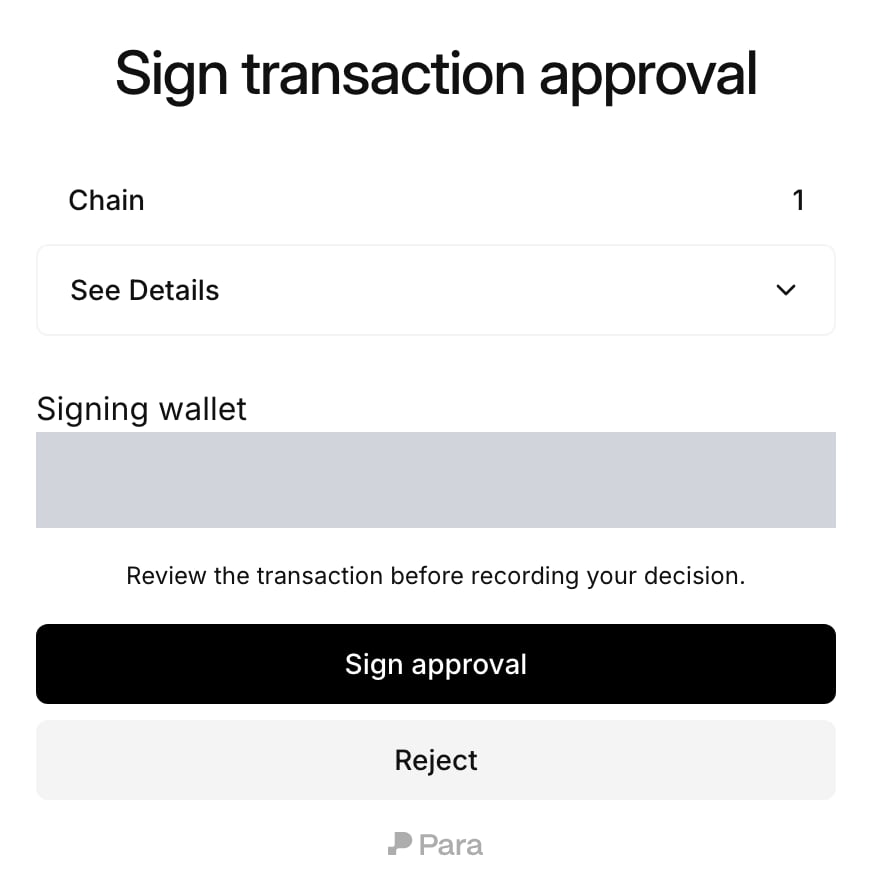
Signers can also use the Portal. `getApprovalCaseReviewUrl({ caseId })` returns a link to a page titled **Sign transaction approval**, where the signer picks a **Signing wallet** and selects **Sign approval**. The page then shows **Signature recorded.**
A signer can refuse instead. **Reject** on the Portal page, or `rejectApprovalCase(caseId)` in your app, ends the collection as `rejected`, the same way one rejection ends any other case.
Para does not notify signers. Send them the case ID or the Portal link through your own app. To withdraw a collection that is still pending, the initiator calls `cancelApprovalCase(caseId)`, and the case ends as `cancelled`.
## Retrieve the signatures
When the case is `completed`, the initiator reads the signatures:
```ts theme={null}
const { transaction, payloadDigest, signatures } = await para.getApprovalSignatures(caseId);
```
Each entry in `signatures` has the signer's `walletId`, the `signature` and the signer's `actorId`. The response also repeats the `transaction`, `payloadDigest` and `signingPayloadBase64` the signers signed.
* Only the user who started the collection can read the signatures.
* The call returns `409` until the case is `completed`.
* Para checks the current policies again before it returns the signatures. If they no longer allow the transaction, the call returns `403` with `completed signature collection is denied by current policy`, and you start a new collection.
* A policy change ends a collection only when its own policy version stops applying, for example because it was replaced or turned off. The collection then becomes `invalidated` with `requirement_unavailable`. Changes to other policies leave it open, subject to the check above.
## Assemble and submit the transaction
Combine the signatures in the form your multisig expects and submit the transaction yourself. For a Safe, map each `walletId` to its owner address, order the signatures the way the Safe contract requires and call `execTransaction`.
A completed collection does not mean the transaction succeeded onchain. If a signer is not an owner of the multisig, or the threshold is higher than the number of signatures, the onchain call fails even though Para completed the case.
This documentation is built and hosted on [Mintlify](https://mintlify.com), a developer documentation platform.


 A signer can refuse instead. **Reject** on the Portal page, or `rejectApprovalCase(caseId)` in your app, ends the collection as `rejected`, the same way one rejection ends any other case.
Para does not notify signers. Send them the case ID or the Portal link through your own app. To withdraw a collection that is still pending, the initiator calls `cancelApprovalCase(caseId)`, and the case ends as `cancelled`.
## Retrieve the signatures
When the case is `completed`, the initiator reads the signatures:
```ts theme={null}
const { transaction, payloadDigest, signatures } = await para.getApprovalSignatures(caseId);
```
Each entry in `signatures` has the signer's `walletId`, the `signature` and the signer's `actorId`. The response also repeats the `transaction`, `payloadDigest` and `signingPayloadBase64` the signers signed.
* Only the user who started the collection can read the signatures.
* The call returns `409` until the case is `completed`.
* Para checks the current policies again before it returns the signatures. If they no longer allow the transaction, the call returns `403` with `completed signature collection is denied by current policy`, and you start a new collection.
* A policy change ends a collection only when its own policy version stops applying, for example because it was replaced or turned off. The collection then becomes `invalidated` with `requirement_unavailable`. Changes to other policies leave it open, subject to the check above.
## Assemble and submit the transaction
Combine the signatures in the form your multisig expects and submit the transaction yourself. For a Safe, map each `walletId` to its owner address, order the signatures the way the Safe contract requires and call `execTransaction`.
A signer can refuse instead. **Reject** on the Portal page, or `rejectApprovalCase(caseId)` in your app, ends the collection as `rejected`, the same way one rejection ends any other case.
Para does not notify signers. Send them the case ID or the Portal link through your own app. To withdraw a collection that is still pending, the initiator calls `cancelApprovalCase(caseId)`, and the case ends as `cancelled`.
## Retrieve the signatures
When the case is `completed`, the initiator reads the signatures:
```ts theme={null}
const { transaction, payloadDigest, signatures } = await para.getApprovalSignatures(caseId);
```
Each entry in `signatures` has the signer's `walletId`, the `signature` and the signer's `actorId`. The response also repeats the `transaction`, `payloadDigest` and `signingPayloadBase64` the signers signed.
* Only the user who started the collection can read the signatures.
* The call returns `409` until the case is `completed`.
* Para checks the current policies again before it returns the signatures. If they no longer allow the transaction, the call returns `403` with `completed signature collection is denied by current policy`, and you start a new collection.
* A policy change ends a collection only when its own policy version stops applying, for example because it was replaced or turned off. The collection then becomes `invalidated` with `requirement_unavailable`. Changes to other policies leave it open, subject to the check above.
## Assemble and submit the transaction
Combine the signatures in the form your multisig expects and submit the transaction yourself. For a Safe, map each `walletId` to its owner address, order the signatures the way the Safe contract requires and call `execTransaction`.