> ## Documentation Index
> Fetch the complete documentation index at: https://docs.getpara.com/llms.txt
> Use this file to discover all available pages before exploring further.
# Web Session Management
> Overview of authentication session management in Para for web applications
export const Link = ({href, label, newTab = false}) => {
const [isHovered, setIsHovered] = useState(false);
return setIsHovered(true)} onMouseLeave={() => setIsHovered(false)}>
{label}
;
};
Para provides a comprehensive set of methods for managing authentication sessions in web applications. These sessions are crucial for secure transaction signing and other authenticated operations. Proper session management helps maintain security while ensuring a seamless user experience.
## Session Configuration
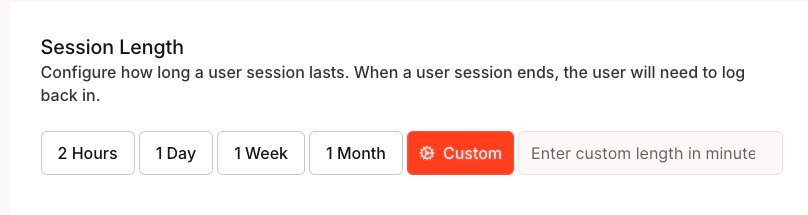
Para session length is configured per API key and can be set up to 30 days through the or CLI. The Para API enforces the configured duration. Signing a message or transaction, or calling `keepSessionAlive()`, can extend an active session according to that configuration.
### Security Considerations
**Shorter Sessions:**
* Enhanced security for sensitive applications
* Reduced risk if device is compromised
* Better for shared or public devices
**Longer Sessions (1 Week - 1 Month):**
* Improved user experience with fewer logins
* Better for personal devices and trusted environments
* Consider implementing automatic session refresh
### Custom Session Length
For custom durations:
1. Select "Custom" option in the Developer Portal
2. Enter duration in minutes
3. Consider your application's specific security needs
4. Balance security with user experience
## Session Management Topics
Explore the different aspects of session management in Para:
## Quick Start
Here's a basic example of checking and maintaining a session:
```typescript theme={null}
const para = new Para(apiKey);
// Check if session is active
const isActive = await para.isSessionActive();
if (!isActive) {
// Handle expired session - route to authentication
} else {
// Extend the session
await para.keepSessionAlive();
}
```
 ### Security Considerations
**Shorter Sessions:**
* Enhanced security for sensitive applications
* Reduced risk if device is compromised
* Better for shared or public devices
**Longer Sessions (1 Week - 1 Month):**
* Improved user experience with fewer logins
* Better for personal devices and trusted environments
* Consider implementing automatic session refresh
### Custom Session Length
For custom durations:
1. Select "Custom" option in the Developer Portal
2. Enter duration in minutes
3. Consider your application's specific security needs
4. Balance security with user experience
## Session Management Topics
Explore the different aspects of session management in Para:
### Security Considerations
**Shorter Sessions:**
* Enhanced security for sensitive applications
* Reduced risk if device is compromised
* Better for shared or public devices
**Longer Sessions (1 Week - 1 Month):**
* Improved user experience with fewer logins
* Better for personal devices and trusted environments
* Consider implementing automatic session refresh
### Custom Session Length
For custom durations:
1. Select "Custom" option in the Developer Portal
2. Enter duration in minutes
3. Consider your application's specific security needs
4. Balance security with user experience
## Session Management Topics
Explore the different aspects of session management in Para: