> ## Documentation Index
> Fetch the complete documentation index at: https://docs.getpara.com/llms.txt
> Use this file to discover all available pages before exploring further.
# Create policies in the Developer Portal
> Build Guardrails for app-owned wallets with the Developer Portal forms, then activate them on a Development key
export const PermissionsCards = ({basePath, pages, cols = 2, horizontal = false}) => {
const ImageCard = Card;
const hrefOverrides = {
"/v3/react/guides/permissions": {
"conditional-approvals": "/v3/react/guides/conditional-approvals"
},
"/v3/rest/permissions": {
"backend": "/v3/rest/permissions-administration"
}
};
const guardrailBases = ["/v3/rest/permissions", "/v3/server/guides/permissions"];
const ownership = guardrailBases.includes(basePath) ? 'guardrail' : 'request';
const overviewImages = {
"/v3/rest/permissions": {
"imgUrl": "/images/v3/cards/rest-guardrails.png",
"horizontalImgUrl": "/images/v3/cards/rest-guardrails-horizontal.png"
},
"/v3/server/guides/permissions": {
"imgUrl": "/images/v3/cards/sdk-server-guardrail-signing.png",
"horizontalImgUrl": "/images/v3/cards/sdk-server-guardrail-signing-horizontal.png"
},
"/v3/react/guides/permissions": {
"imgUrl": "/images/v3/cards/sdk-get-policy-consent-url.png",
"horizontalImgUrl": "/images/v3/cards/sdk-get-policy-consent-url-horizontal.png"
},
"/v3/react-native/guides/permissions": {
"imgUrl": "/images/v3/cards/sdk-get-policy-consent-url.png",
"horizontalImgUrl": "/images/v3/cards/sdk-get-policy-consent-url-horizontal.png"
}
};
const registry = {
overview: {
title: "Permissions overview",
description: "Return to the start of the Permissions path.",
...overviewImages[basePath]
},
"developer-portal": {
title: "Create policies in the Developer Portal",
description: "Build a policy with the Portal forms and activate it on a beta key.",
imgUrl: "/images/v3/cards/developer-portal-policy-form.png",
horizontalImgUrl: "/images/v3/cards/developer-portal-policy-form-horizontal.png"
},
"json": {
title: "Write policy JSON",
description: "Move to JSON for policies the forms cannot express.",
imgUrl: "/images/v3/cards/developer-portal-policy-json.png",
horizontalImgUrl: "/images/v3/cards/developer-portal-policy-json-horizontal.png"
},
"testing": {
title: "Test your policies",
description: "Exercise every rule on beta before you ship.",
imgUrl: "/images/v3/cards/concept-policy-testing.png",
horizontalImgUrl: "/images/v3/cards/concept-policy-testing-horizontal.png"
},
"production": {
title: "Go to production",
description: "Request a production review and publish your policy.",
imgUrl: "/images/v3/cards/concept-policy-publication.png",
horizontalImgUrl: "/images/v3/cards/concept-policy-publication-horizontal.png"
},
"conditional-approvals": {
title: "Conditional approvals",
description: "Require people to approve a request before it signs.",
imgUrl: "/images/v3/cards/portal-conditional-approval-case.png",
horizontalImgUrl: "/images/v3/cards/portal-conditional-approval-case-horizontal.png"
},
"approval-signatures": {
title: "Collect approval signatures",
description: "Collect signatures from approvers for multisig workflows.",
imgUrl: "/images/v3/cards/sdk-get-approval-signatures.png",
horizontalImgUrl: "/images/v3/cards/sdk-get-approval-signatures-horizontal.png"
},
"adjustable-parameters": {
title: "Adjustable parameters",
description: "Let users set their own limits and managers adjust approval settings.",
imgUrl: "/images/v3/cards/portal-user-policy-limits.png",
horizontalImgUrl: "/images/v3/cards/portal-user-policy-limits-horizontal.png"
},
"lifecycle": {
title: "Manage the policy lifecycle",
description: "Version, activate, replace and retire policies.",
imgUrl: "/images/v3/cards/developer-portal-policy-versions.png",
horizontalImgUrl: "/images/v3/cards/developer-portal-policy-versions-horizontal.png"
},
"backend": {
title: "Manage permissions from your backend",
description: "Assign approvers and read policy state with your server secret.",
imgUrl: "/images/v3/cards/rest-permissions-administration.png",
horizontalImgUrl: "/images/v3/cards/rest-permissions-administration-horizontal.png"
},
templates: ownership === "guardrail" ? {
title: "Guardrail templates",
description: "Start from a tested Guardrail policy.",
imgUrl: "/images/v3/cards/concept-guardrail-templates.png",
horizontalImgUrl: "/images/v3/cards/concept-guardrail-templates-horizontal.png"
} : {
title: "Request templates",
description: "Start from a tested Request policy.",
imgUrl: "/images/v3/cards/concept-request-templates.png",
horizontalImgUrl: "/images/v3/cards/concept-request-templates-horizontal.png"
},
"guardrail:templates/spending-caps": {
title: "Spending caps",
description: "Cap native and token transfers per transaction or per day.",
imgUrl: "/images/v3/cards/concept-spending-limits.png",
horizontalImgUrl: "/images/v3/cards/concept-spending-limits-horizontal.png"
},
"guardrail:templates/allowlists": {
title: "Recipient and contract allowlists",
description: "Limit transfers and contract calls to addresses you know.",
imgUrl: "/images/v3/cards/concept-recipient-allowlists.png",
horizontalImgUrl: "/images/v3/cards/concept-recipient-allowlists-horizontal.png"
},
"guardrail:templates/approval-tiers": {
title: "Approval thresholds and tiers",
description: "Hold large transfers for approval, or deny the largest.",
imgUrl: "/images/v3/cards/concept-approval-tiers.png",
horizontalImgUrl: "/images/v3/cards/concept-approval-tiers-horizontal.png"
},
"guardrail:templates/treasury": {
title: "Treasury approvals",
description: "Deny unplanned actions and approve wallet or Safe payouts in stages.",
imgUrl: "/images/v3/cards/concept-treasury-approvals.png",
horizontalImgUrl: "/images/v3/cards/concept-treasury-approvals-horizontal.png"
},
"guardrail:templates/message-signing": {
title: "Message and raw signing",
description: "Block or hold raw signatures, and block permits.",
imgUrl: "/images/v3/cards/concept-signing-actions.png",
horizontalImgUrl: "/images/v3/cards/concept-signing-actions-horizontal.png"
},
"request:templates/allowances": {
title: "Transfer allowances",
description: "Let small transfers and a daily budget sign without a prompt.",
imgUrl: "/images/v3/cards/concept-spending-limits.png",
horizontalImgUrl: "/images/v3/cards/concept-spending-limits-horizontal.png"
},
"request:templates/recipients-and-contracts": {
title: "Known recipients and app contracts",
description: "Cover transfers to known addresses and your contract's calls.",
imgUrl: "/images/v3/cards/concept-recipient-allowlists.png",
horizontalImgUrl: "/images/v3/cards/concept-recipient-allowlists-horizontal.png"
},
"request:templates/cosigner-approval": {
title: "Co-signer approval",
description: "Send large transfers to a co-signer for approval.",
imgUrl: "/images/v3/cards/portal-conditional-approval-case.png",
horizontalImgUrl: "/images/v3/cards/portal-conditional-approval-case-horizontal.png"
},
"request:templates/adjustable-limits": {
title: "User-adjustable limits",
description: "Let each user choose their own spending limits.",
imgUrl: "/images/v3/cards/portal-user-policy-limits.png",
horizontalImgUrl: "/images/v3/cards/portal-user-policy-limits-horizontal.png"
},
"request:templates/message-signing": {
title: "Message signing",
description: "Sign messages from users' wallets without a prompt.",
imgUrl: "/images/v3/cards/concept-signing-actions.png",
horizontalImgUrl: "/images/v3/cards/concept-signing-actions-horizontal.png"
}
};
const entryFor = slug => registry[slug] || registry[`${ownership}:${slug}`];
const hrefFor = slug => {
if (slug === 'overview') return basePath;
const overrides = hrefOverrides[basePath] || ({});
return overrides[slug] || `${basePath}/${slug}`;
};
return
{pages.map(slug => {
const entry = entryFor(slug);
return ;
})}
;
};
The pregenerated wallets your server signs with are app-owned, so the policies you build here are Guardrails, created on the **Guardrails** tab.
Build a policy with the Developer Portal forms, save it as a draft and activate it on a Development key. When a policy needs more than the forms offer, the same flow hands off to a JSON editor.
Author and test policies on a **Development** key, which uses Para's beta environment. Production keys are read-only in the Developer Portal. Para publishes production policies after a production review.
## Open Permissions
Each API key has its own policies. Select your project, pick a **Development** key in the key switcher, then open **Permissions** under **Configuration** in the sidebar.
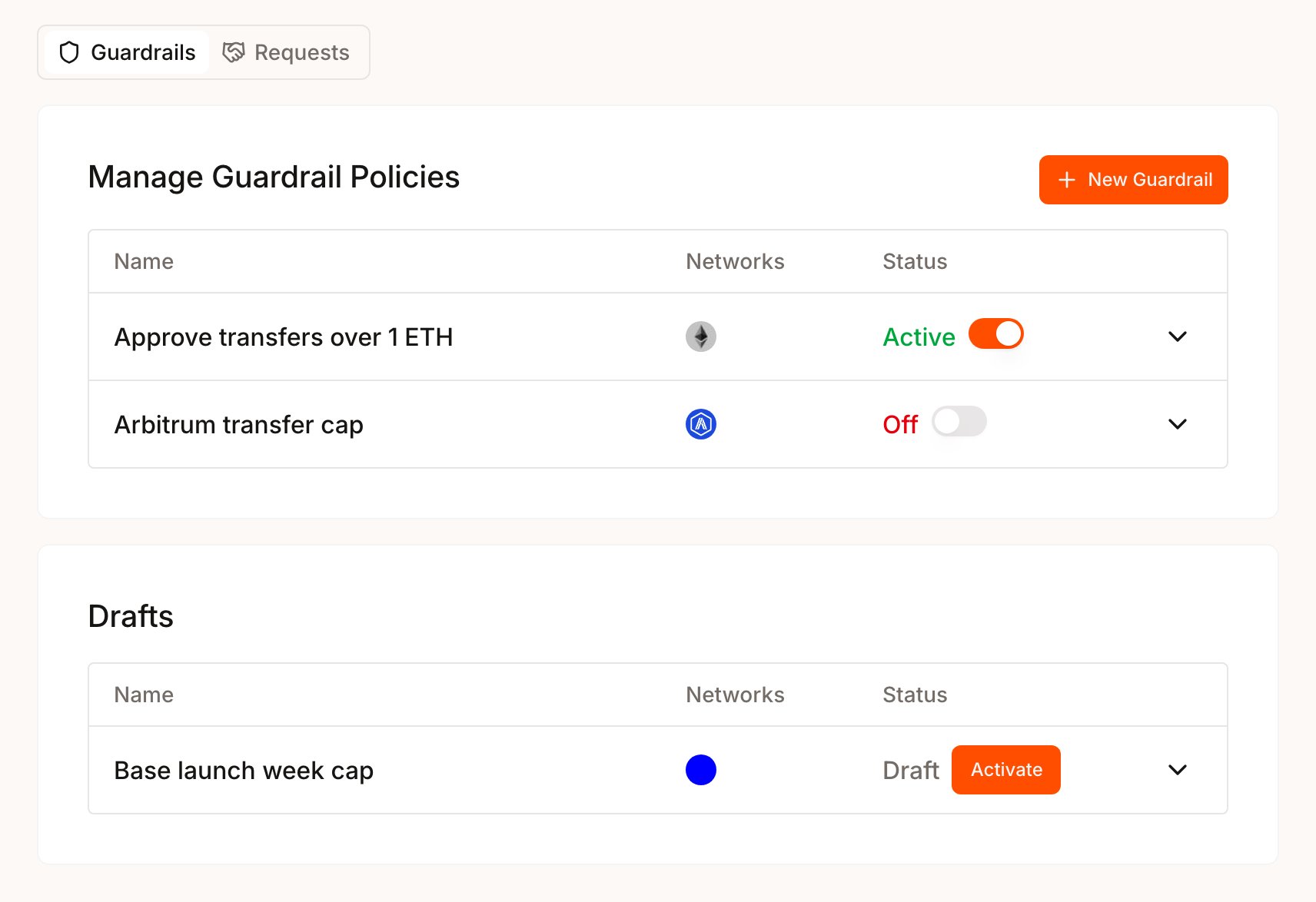
The page has two tabs, and the tab you start from sets the policy type. There is no separate type picker.
| Tab | Policy type | Wallets it governs |
| - | - | - |
| **Guardrails** | Guardrail | App-owned wallets, signed by your backend |
| **Requests** | Request | User-owned wallets, after the user consents |
Each row shows its **Status**: `Active`, `Expired`, `Draft` or `Off`. Only active policies inside their time window affect signing. A draft can be activated only while its time window is open. Outside it, selecting **Activate** shows the error `policy record activation window is not active`.
 ## Create a policy
A policy is built in three screens: the policy details, the logic and a review. Saving creates a draft, and nothing is enforced until you activate it.
Select **Guardrails** or **Requests**. Select **Add** for your first policy, or **New Guardrail** or **New Request** once the tab has policies.
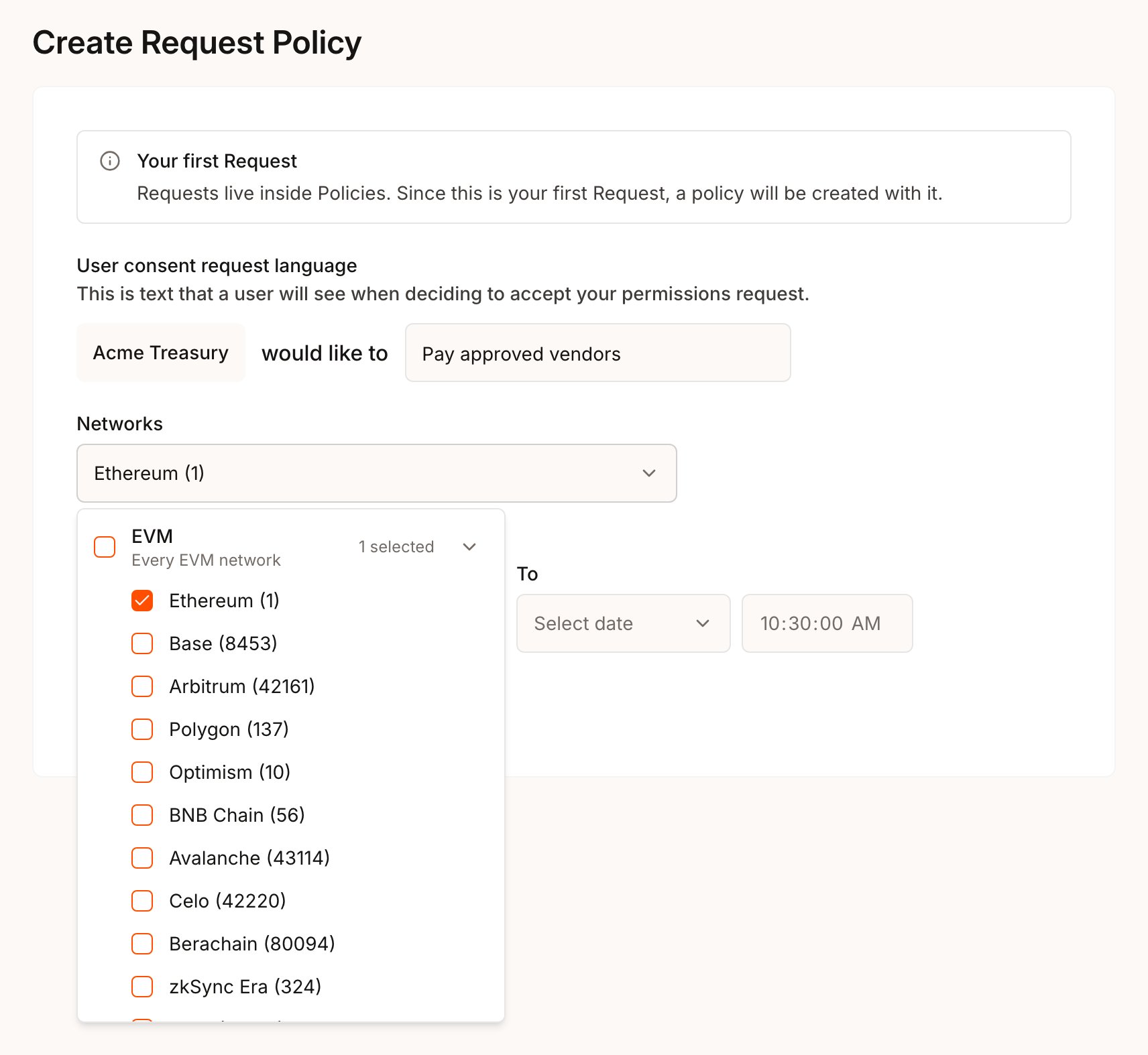
Fill in the first screen:
* **Guardrail Policy Name** names a Guardrail in the list.
* **User consent request language** is the text users read on the consent screen, after your app's name and "would like to". Write it as an action, such as "send up to 0.2 ETH a day".
* **Networks** opens a checklist grouped by wallet type: EVM, Solana, Cosmos, Stellar and Sui. Check a group to cover every network of that type, or check individual networks. A policy covers one wallet type.
* **Policy Time Window (Optional)** limits when the policy applies. Leave **From** and **To** empty to apply it as soon as it is active.
Select **Continue**.
## Create a policy
A policy is built in three screens: the policy details, the logic and a review. Saving creates a draft, and nothing is enforced until you activate it.
Select **Guardrails** or **Requests**. Select **Add** for your first policy, or **New Guardrail** or **New Request** once the tab has policies.
Fill in the first screen:
* **Guardrail Policy Name** names a Guardrail in the list.
* **User consent request language** is the text users read on the consent screen, after your app's name and "would like to". Write it as an action, such as "send up to 0.2 ETH a day".
* **Networks** opens a checklist grouped by wallet type: EVM, Solana, Cosmos, Stellar and Sui. Check a group to cover every network of that type, or check individual networks. A policy covers one wallet type.
* **Policy Time Window (Optional)** limits when the policy applies. Leave **From** and **To** empty to apply it as soon as it is active.
Select **Continue**.
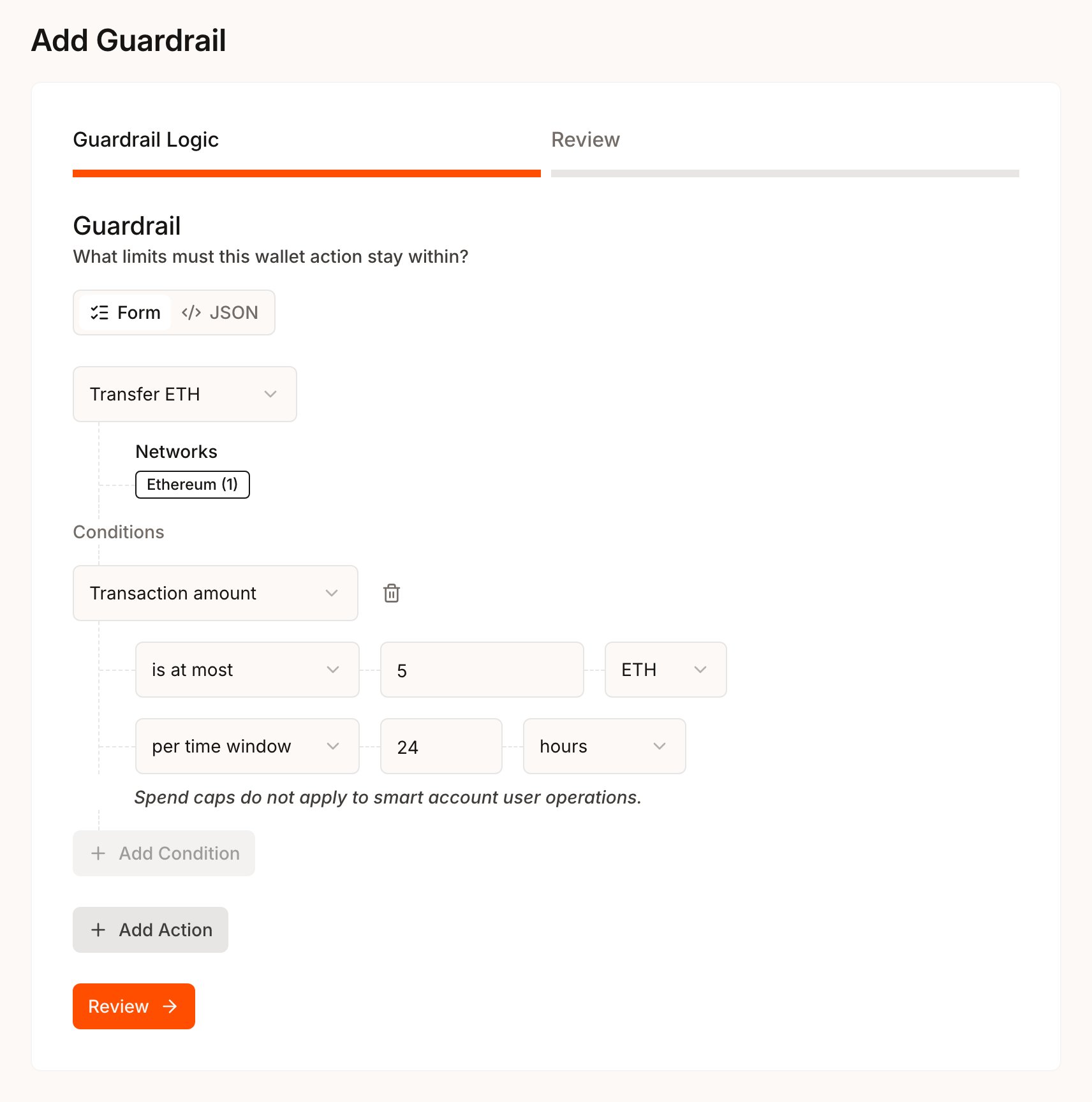
 On the **Guardrail Logic** or **Request Logic** step, choose an action under **Select Action**, fill in its target fields, then select **Add Condition** to narrow it. Select **Add Action** to cover another action in the same policy.
The two types read conditions differently:
* In a **Guardrail**, the target and condition describe what that action may do. Para blocks requests of that action outside the boundary. An action with no condition blocks every request of that action outside its target fields. For actions with no target fields, such as **Transfer ETH**, **Deploy a contract** and **Native transfer**, that means every request of that action on the selected networks.
* In a **Request**, the target and conditions describe what the user grants. All conditions on an action must hold. **User consent** is always **Required**.
On the **Guardrail Logic** or **Request Logic** step, choose an action under **Select Action**, fill in its target fields, then select **Add Condition** to narrow it. Select **Add Action** to cover another action in the same policy.
The two types read conditions differently:
* In a **Guardrail**, the target and condition describe what that action may do. Para blocks requests of that action outside the boundary. An action with no condition blocks every request of that action outside its target fields. For actions with no target fields, such as **Transfer ETH**, **Deploy a contract** and **Native transfer**, that means every request of that action on the selected networks.
* In a **Request**, the target and conditions describe what the user grants. All conditions on an action must hold. **User consent** is always **Required**.
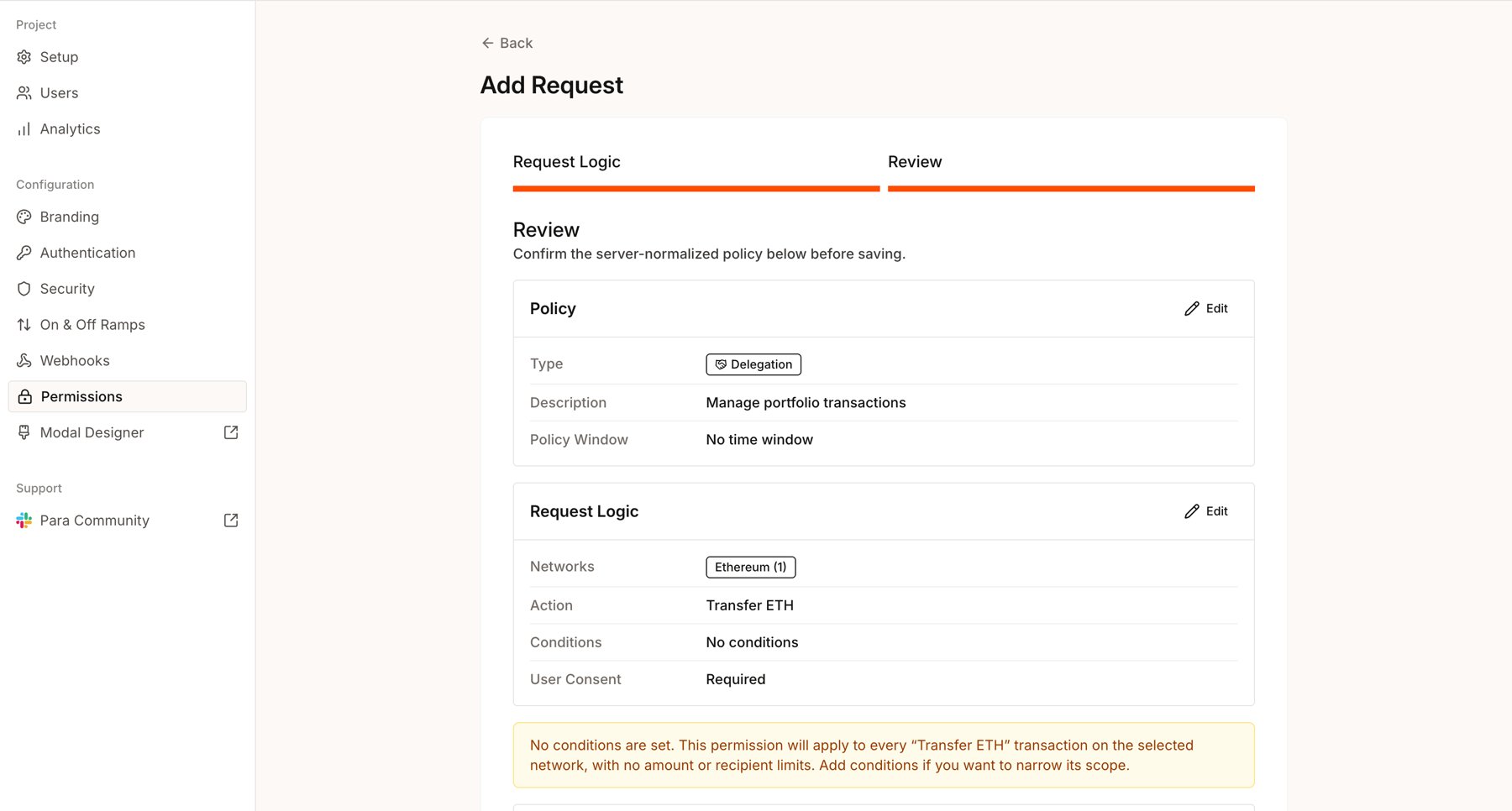
 Select **Review**. Para validates the policy and shows the server-normalized version, a warning when no action has a condition, and an **Overlaps with active policies** list when other active policies cover the same requests. Every overlapping policy applies, and a block in any overlapping Guardrail wins.
Select **Save Draft** when the summary matches your intent.
Select **Review**. Para validates the policy and shows the server-normalized version, a warning when no action has a condition, and an **Overlaps with active policies** list when other active policies cover the same requests. Every overlapping policy applies, and a block in any overlapping Guardrail wins.
Select **Save Draft** when the summary matches your intent.
 In the list, select **Activate** on the draft row. The policy now applies to signing on this key, and the first active policy turns Permissions on for the key. Test it before you build on it.
Permissions enforces policies for a key only while at least one active policy is inside its time window. When the last one is turned off or its window ends, Para stops checking policies on REST and SDK signing. App-owned wallets then sign without checks. User-owned wallets show the same review pop-ups as a key without Permissions, such as those the **Transaction Pop-ups** setting turns on.
You can keep one draft per policy type. Activate or delete it before you start another.
## What the forms support
The forms cover common transfer, contract and Safe policies. The actions available depend on the wallet type of the networks you picked.
| Action | Target fields | Conditions |
| - | - | - |
| **Transfer ETH** | None | Recipient address, Transaction amount |
| **Transfer tokens** | **Contract Address** of the token. **Function Name** is fixed to `transfer` | Recipient address, Transaction amount, Contract argument |
| **Call a contract** | **Contract Address**, **Function Name** | Transaction amount, Contract argument |
| **Execute a Safe transaction** | **Safe Contract Address**. **Function Name** is fixed to `execTransaction` | None |
| **Deploy a contract** | None | None |
Enter EVM addresses in lowercase. Native amounts accept `ETH` or `wei`. Token amounts use the token's base units.
**Execute a Safe transaction** takes no conditions in the form. To limit the payment a Safe transaction makes, such as its recipient, amount, asset or Safe spend over a time window, write the rule as JSON with the [Safe payment facts](/v3/references/permissions/facts#safe-payments).
| Action | Target fields | Conditions |
| - | - | - |
| **Native transfer** | None | Recipient address, Transaction amount |
| **Token transfer** | **Token Asset**, such as `solana:token:`, `cosmos::` or `stellar::
In the list, select **Activate** on the draft row. The policy now applies to signing on this key, and the first active policy turns Permissions on for the key. Test it before you build on it.
Permissions enforces policies for a key only while at least one active policy is inside its time window. When the last one is turned off or its window ends, Para stops checking policies on REST and SDK signing. App-owned wallets then sign without checks. User-owned wallets show the same review pop-ups as a key without Permissions, such as those the **Transaction Pop-ups** setting turns on.
You can keep one draft per policy type. Activate or delete it before you start another.
## What the forms support
The forms cover common transfer, contract and Safe policies. The actions available depend on the wallet type of the networks you picked.
| Action | Target fields | Conditions |
| - | - | - |
| **Transfer ETH** | None | Recipient address, Transaction amount |
| **Transfer tokens** | **Contract Address** of the token. **Function Name** is fixed to `transfer` | Recipient address, Transaction amount, Contract argument |
| **Call a contract** | **Contract Address**, **Function Name** | Transaction amount, Contract argument |
| **Execute a Safe transaction** | **Safe Contract Address**. **Function Name** is fixed to `execTransaction` | None |
| **Deploy a contract** | None | None |
Enter EVM addresses in lowercase. Native amounts accept `ETH` or `wei`. Token amounts use the token's base units.
**Execute a Safe transaction** takes no conditions in the form. To limit the payment a Safe transaction makes, such as its recipient, amount, asset or Safe spend over a time window, write the rule as JSON with the [Safe payment facts](/v3/references/permissions/facts#safe-payments).
| Action | Target fields | Conditions |
| - | - | - |
| **Native transfer** | None | Recipient address, Transaction amount |
| **Token transfer** | **Token Asset**, such as `solana:token:`, `cosmos::` or `stellar:::` | Recipient address (Recipient token account on Solana), Transaction amount |
| **Execution target** | **Execution Target**: the program or contract | None |
Amounts use base units: lamports on Solana, stroops on Stellar and the denom's base units on Cosmos. **Native transfer** is offered when you check the whole Cosmos group, or when every network you check is Cosmos Hub, Noble, Osmosis, Celestia, dYdX or Injective.
| Action | Target fields | Conditions |
| - | - | - |
| **Native transfer** | None | Recipient address, Transaction amount |
| **Execution target** | **Execution Target**: the package | None |
Sui has no token transfer action.
Recipient and contract argument conditions compare with **equals**, **does not equal** or **is one of**, which takes comma-separated values. Transaction amount compares with **equals**, **does not equal**, **is greater than**, **is at least**, **is less than** or **is at most**. A Transaction amount set **per time window** offers only the last four.
Each action has a condition limit: one condition per Guardrail action and up to eight per Request action. **Add Condition** turns off when an action reaches its limit.
On transfer actions, a Transaction amount can apply **per transaction** or **per time window**. A time window counts spend across requests over a number of hours, days or weeks.
Native limits count positive native value: on EVM from any transaction, contract calls included, and on Solana, Cosmos, Stellar and Sui from native transfers. Token limits count ERC-20 `transfer` calls on EVM, including ERC-20 transfers sent through Para gas sponsorship, and token transfers on Solana, Cosmos and Stellar. Sui has no token limits. Gas and fees never count. Apart from those sponsored transfers, smart account user operations do not count toward EVM limits. A token limit that names an asset counts only that asset. Each network, asset and window has its own budget, so a limit of 1 ETH per day on Ethereum and Base allows 1 ETH per day on each network. Payments a Safe makes count only toward the Safe limits, `safe.spend.native` and `safe.spend.erc20`, which keep one budget per Safe. See [Metered facts](/v3/references/permissions/facts#metered-facts) for the full rules.
The forms cannot save message signing, month-based or lifetime spend windows, or optional consent. Policies that target specific wallets or users, combine conditions in other ways, or need adjustable parameters, approval requirements or rules that block or hold raw signatures are written as JSON.
While Permissions is on, raw signatures follow the same defaults as other signing requests: an app-owned wallet signs them, and a user-owned wallet sends them to the user for review. Rules that name the `raw_signature` action, and rules with `"actions": "all"`, can change that. Raw signatures are `sign-raw` requests, messages from Solana, Stellar and Sui wallets, and REST `sign-message` requests from a Cosmos wallet that do not pass `walletType: "EVM"`. The SDKs sign messages from Cosmos wallets as EVM `sign_message` requests. Raw signatures carry no network a selector can name, so only a policy without `chainId` governs them. A rule that names `raw_signature` can read only `para.wallet.*` facts. The Developer Portal forms cannot create one, so write it in policy JSON, with **Edit JSON** in the Developer Portal or with the [CLI](/v3/cli/permissions).
## Edit, turn off or delete a policy
The networks you pick identify a policy. To edit one, you start a new policy of the same type and pick exactly the same networks. Picking different networks creates a separate policy instead.
| Task | How |
| - | - |
| View a policy | Expand its row. The details show each action and condition, plus **Normalized policy JSON** with **Copy JSON**. |
| Edit a policy | Select **New Guardrail** or **New Request** and pick the same networks. The title changes to **Edit Guardrail Policy** or **Edit Request Policy**. Select **Continue** to load its rules, then **Review** and **Save changes**. |
| Turn a policy off or on | Use the switch on the row. Turning an `Off` policy back on publishes a copy of it, as described below. |
| Delete a policy | Expand a `Draft` or `Off` row, select **Delete permission** and confirm with **Delete**. Active policies cannot be deleted. |
**Save changes** on an active policy replaces it immediately, as the next version. Test edits to active policies on the Development key before you rely on them.
Turning an `Off` policy back on in the Developer Portal does not create the next version. The Portal publishes a copy under a new policy ID, `dev-portal-permission-`, at version `1`, activates it and archives the `Off` record. Update any policy ID your app stores, such as for usage reads or consent links, and on a Request, each user has to consent to the copy. The switch is unavailable, with the reason in its tooltip, while a draft of the same type exists, while another policy of the same type is active on the same networks, and once the policy's time window has ended. Activate or delete that draft, turn off the other policy, or create a new policy with a current window.
### Changes that affect open approvals
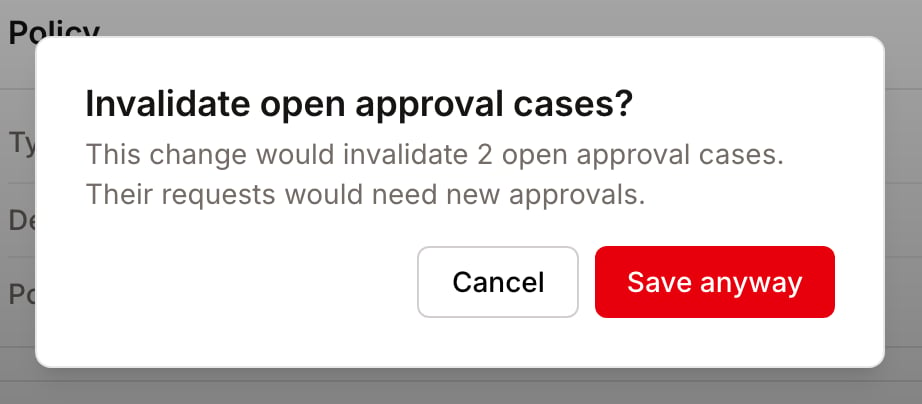
Saving changes, activating a draft, turning a policy off and turning it back on can all invalidate open approval cases.
An approval case is open while it is `pending`, and after it completes until it is used to sign or expires. Para refuses a change that would invalidate open cases until you confirm it. A confirmed change ends those cases as `invalidated`, and their requests need a new attempt.
The Developer Portal asks in a dialog, **Invalidate open approval cases?**, which shows how many cases the change affects.
| Your choice | What happens |
| - | - |
| **Save anyway**, **Activate anyway**, **Turn off anyway** or **Turn on anyway** | The change applies and the affected cases are invalidated |
| **Cancel** | Nothing changes, and the open cases continue |
 ## Move to JSON
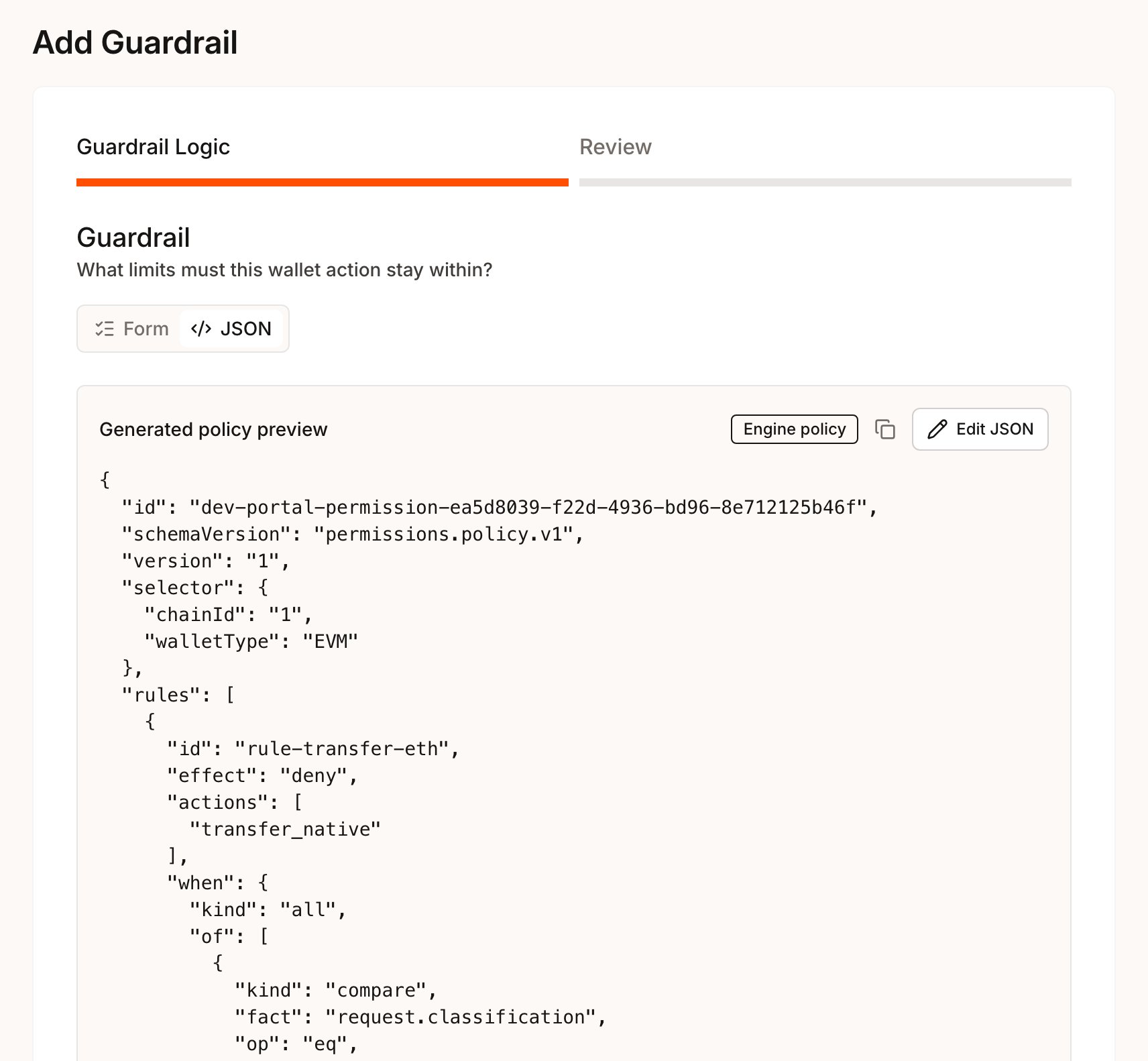
The **Guardrail Logic** and **Request Logic** steps have two tabs: **Form** and **JSON**. The **JSON** tab shows the policy your form generates, marked **Engine policy** when it can be saved or **Preview only** when it cannot.
Select **Edit JSON** to edit the policy directly. While JSON edits exist, the **Form** tab is disabled. **Discard JSON edits** returns you to the form.
## Move to JSON
The **Guardrail Logic** and **Request Logic** steps have two tabs: **Form** and **JSON**. The **JSON** tab shows the policy your form generates, marked **Engine policy** when it can be saved or **Preview only** when it cannot.
Select **Edit JSON** to edit the policy directly. While JSON edits exist, the **Form** tab is disabled. **Discard JSON edits** returns you to the form.
 Some policies use rules the forms cannot show, such as adjustable parameters or nested condition groups. When you edit one of these, it opens straight in the JSON editor with the notice "This policy has rules the form can't show, so it can only be edited as JSON." The **Write policy JSON** page in your platform's Permissions guides covers the editor and the CLI.
## Production keys
Development and production keys keep separate policies, and nothing copies across on its own. On a **Production** key, the Permissions page is read-only: you can expand rows and read their JSON, but you cannot add, activate, turn off or delete policies.
Until Permissions is on for a production key, the key shows a banner with **Request production review** once a Development key in the same project has an active policy. Selecting it asks Para to review your beta policy and publish it to the production key. The **Go to production** page in your platform's Permissions guides covers what to finish first and what happens next.
This documentation is built and hosted on [Mintlify](https://mintlify.com), a developer documentation platform.
Some policies use rules the forms cannot show, such as adjustable parameters or nested condition groups. When you edit one of these, it opens straight in the JSON editor with the notice "This policy has rules the form can't show, so it can only be edited as JSON." The **Write policy JSON** page in your platform's Permissions guides covers the editor and the CLI.
## Production keys
Development and production keys keep separate policies, and nothing copies across on its own. On a **Production** key, the Permissions page is read-only: you can expand rows and read their JSON, but you cannot add, activate, turn off or delete policies.
Until Permissions is on for a production key, the key shows a banner with **Request production review** once a Development key in the same project has an active policy. Selecting it asks Para to review your beta policy and publish it to the production key. The **Go to production** page in your platform's Permissions guides covers what to finish first and what happens next.
This documentation is built and hosted on [Mintlify](https://mintlify.com), a developer documentation platform.