> ## Documentation Index
> Fetch the complete documentation index at: https://docs.getpara.com/llms.txt
> Use this file to discover all available pages before exploring further.
# Write policy JSON
> Write Guardrails as JSON in the Developer Portal editor or with the CLI
export const PermissionsCards = ({basePath, pages, cols = 2, horizontal = false}) => {
const ImageCard = Card;
const hrefOverrides = {
"/v3/react/guides/permissions": {
"conditional-approvals": "/v3/react/guides/conditional-approvals"
},
"/v3/rest/permissions": {
"backend": "/v3/rest/permissions-administration"
}
};
const guardrailBases = ["/v3/rest/permissions", "/v3/server/guides/permissions"];
const ownership = guardrailBases.includes(basePath) ? 'guardrail' : 'request';
const overviewImages = {
"/v3/rest/permissions": {
"imgUrl": "/images/v3/cards/rest-guardrails.png",
"horizontalImgUrl": "/images/v3/cards/rest-guardrails-horizontal.png"
},
"/v3/server/guides/permissions": {
"imgUrl": "/images/v3/cards/sdk-server-guardrail-signing.png",
"horizontalImgUrl": "/images/v3/cards/sdk-server-guardrail-signing-horizontal.png"
},
"/v3/react/guides/permissions": {
"imgUrl": "/images/v3/cards/sdk-get-policy-consent-url.png",
"horizontalImgUrl": "/images/v3/cards/sdk-get-policy-consent-url-horizontal.png"
},
"/v3/react-native/guides/permissions": {
"imgUrl": "/images/v3/cards/sdk-get-policy-consent-url.png",
"horizontalImgUrl": "/images/v3/cards/sdk-get-policy-consent-url-horizontal.png"
}
};
const registry = {
overview: {
title: "Permissions overview",
description: "Return to the start of the Permissions path.",
...overviewImages[basePath]
},
"developer-portal": {
title: "Create policies in the Developer Portal",
description: "Build a policy with the Portal forms and activate it on a beta key.",
imgUrl: "/images/v3/cards/developer-portal-policy-form.png",
horizontalImgUrl: "/images/v3/cards/developer-portal-policy-form-horizontal.png"
},
"json": {
title: "Write policy JSON",
description: "Move to JSON for policies the forms cannot express.",
imgUrl: "/images/v3/cards/developer-portal-policy-json.png",
horizontalImgUrl: "/images/v3/cards/developer-portal-policy-json-horizontal.png"
},
"testing": {
title: "Test your policies",
description: "Exercise every rule on beta before you ship.",
imgUrl: "/images/v3/cards/concept-policy-testing.png",
horizontalImgUrl: "/images/v3/cards/concept-policy-testing-horizontal.png"
},
"production": {
title: "Go to production",
description: "Request a production review and publish your policy.",
imgUrl: "/images/v3/cards/concept-policy-publication.png",
horizontalImgUrl: "/images/v3/cards/concept-policy-publication-horizontal.png"
},
"conditional-approvals": {
title: "Conditional approvals",
description: "Require people to approve a request before it signs.",
imgUrl: "/images/v3/cards/portal-conditional-approval-case.png",
horizontalImgUrl: "/images/v3/cards/portal-conditional-approval-case-horizontal.png"
},
"approval-signatures": {
title: "Collect approval signatures",
description: "Collect signatures from approvers for multisig workflows.",
imgUrl: "/images/v3/cards/sdk-get-approval-signatures.png",
horizontalImgUrl: "/images/v3/cards/sdk-get-approval-signatures-horizontal.png"
},
"adjustable-parameters": {
title: "Adjustable parameters",
description: "Let users set their own limits and managers adjust approval settings.",
imgUrl: "/images/v3/cards/portal-user-policy-limits.png",
horizontalImgUrl: "/images/v3/cards/portal-user-policy-limits-horizontal.png"
},
"lifecycle": {
title: "Manage the policy lifecycle",
description: "Version, activate, replace and retire policies.",
imgUrl: "/images/v3/cards/developer-portal-policy-versions.png",
horizontalImgUrl: "/images/v3/cards/developer-portal-policy-versions-horizontal.png"
},
"backend": {
title: "Manage permissions from your backend",
description: "Assign approvers and read policy state with your server secret.",
imgUrl: "/images/v3/cards/rest-permissions-administration.png",
horizontalImgUrl: "/images/v3/cards/rest-permissions-administration-horizontal.png"
},
templates: ownership === "guardrail" ? {
title: "Guardrail templates",
description: "Start from a tested Guardrail policy.",
imgUrl: "/images/v3/cards/concept-guardrail-templates.png",
horizontalImgUrl: "/images/v3/cards/concept-guardrail-templates-horizontal.png"
} : {
title: "Request templates",
description: "Start from a tested Request policy.",
imgUrl: "/images/v3/cards/concept-request-templates.png",
horizontalImgUrl: "/images/v3/cards/concept-request-templates-horizontal.png"
},
"guardrail:templates/spending-caps": {
title: "Spending caps",
description: "Cap native and token transfers per transaction or per day.",
imgUrl: "/images/v3/cards/concept-spending-limits.png",
horizontalImgUrl: "/images/v3/cards/concept-spending-limits-horizontal.png"
},
"guardrail:templates/allowlists": {
title: "Recipient and contract allowlists",
description: "Limit transfers and contract calls to addresses you know.",
imgUrl: "/images/v3/cards/concept-recipient-allowlists.png",
horizontalImgUrl: "/images/v3/cards/concept-recipient-allowlists-horizontal.png"
},
"guardrail:templates/approval-tiers": {
title: "Approval thresholds and tiers",
description: "Hold large transfers for approval, or deny the largest.",
imgUrl: "/images/v3/cards/concept-approval-tiers.png",
horizontalImgUrl: "/images/v3/cards/concept-approval-tiers-horizontal.png"
},
"guardrail:templates/treasury": {
title: "Treasury approvals",
description: "Deny unplanned actions and approve wallet or Safe payouts in stages.",
imgUrl: "/images/v3/cards/concept-treasury-approvals.png",
horizontalImgUrl: "/images/v3/cards/concept-treasury-approvals-horizontal.png"
},
"guardrail:templates/message-signing": {
title: "Message and raw signing",
description: "Block or hold raw signatures, and block permits.",
imgUrl: "/images/v3/cards/concept-signing-actions.png",
horizontalImgUrl: "/images/v3/cards/concept-signing-actions-horizontal.png"
},
"request:templates/allowances": {
title: "Transfer allowances",
description: "Let small transfers and a daily budget sign without a prompt.",
imgUrl: "/images/v3/cards/concept-spending-limits.png",
horizontalImgUrl: "/images/v3/cards/concept-spending-limits-horizontal.png"
},
"request:templates/recipients-and-contracts": {
title: "Known recipients and app contracts",
description: "Cover transfers to known addresses and your contract's calls.",
imgUrl: "/images/v3/cards/concept-recipient-allowlists.png",
horizontalImgUrl: "/images/v3/cards/concept-recipient-allowlists-horizontal.png"
},
"request:templates/cosigner-approval": {
title: "Co-signer approval",
description: "Send large transfers to a co-signer for approval.",
imgUrl: "/images/v3/cards/portal-conditional-approval-case.png",
horizontalImgUrl: "/images/v3/cards/portal-conditional-approval-case-horizontal.png"
},
"request:templates/adjustable-limits": {
title: "User-adjustable limits",
description: "Let each user choose their own spending limits.",
imgUrl: "/images/v3/cards/portal-user-policy-limits.png",
horizontalImgUrl: "/images/v3/cards/portal-user-policy-limits-horizontal.png"
},
"request:templates/message-signing": {
title: "Message signing",
description: "Sign messages from users' wallets without a prompt.",
imgUrl: "/images/v3/cards/concept-signing-actions.png",
horizontalImgUrl: "/images/v3/cards/concept-signing-actions-horizontal.png"
}
};
const entryFor = slug => registry[slug] || registry[`${ownership}:${slug}`];
const hrefFor = slug => {
if (slug === 'overview') return basePath;
const overrides = hrefOverrides[basePath] || ({});
return overrides[slug] || `${basePath}/${slug}`;
};
return
{pages.map(slug => {
const entry = entryFor(slug);
return ;
})}
;
};
export const Card = ({imgUrl, compactImgUrl, title, description, href, horizontal = false, newTab = false}) => {
const [isHovered, setIsHovered] = useState(false);
const handleClick = e => {
e.preventDefault();
if (newTab) {
window.open(href, '_blank', 'noopener,noreferrer');
} else {
window.location.href = href;
}
};
return ;
};
Your server's pregenerated wallets are governed by Guardrails, so start from the **Guardrail** example below.
Write a policy as JSON when it needs more than the Developer Portal forms offer. You can edit JSON in the Portal or submit a file with the CLI. Both validate the policy before it is saved. A new policy starts as a draft that you activate, while an edit to an active policy applies as soon as you save it.
JSON writes from the Portal or the CLI apply to **Development** keys, which use Para's beta environment. A policy reaches production through a production review, not by writing to a production key.
## When to move to JSON
The forms cover one action pattern at a time. Switch to JSON when a policy needs to:
* target specific wallets with `walletId`, or specific users with `userId` on a Request;
* combine conditions with `all`, `any` and `not`, or use more conditions than the forms allow;
* cover actions the forms do not offer, such as token approvals, NFT transfers, message signing or raw signatures;
* read facts the forms do not offer, such as gas fees, the request classification or the [Safe payment facts](/v3/references/permissions/facts#safe-payments) (`request.safe.*` and `safe.spend.*`), which read the payment inside a Safe transaction;
* require approvals with an `approvalRequirement`, or let users adjust a limit with a `parameter`.
The Para client and server SDKs, including their viem, ethers and wagmi integrations, sign EIP-712 typed data and EIP-7702 authorizations as a message over their hash, so Para evaluates those requests as `sign_message`. The `sign_typed_data` and `sign_authorization` actions, and the facts Para reads from typed data and authorizations, such as `request.typedData.primaryType`, apply only to the REST API's `sign-typed-data` and `sign-authorization` routes, which the REST SDK calls.
## Edit JSON in the Developer Portal
The JSON editor lives on the logic step of the normal Portal flow, so you start from the tab, networks and time window you chose on the first screen. The time window is set there and is not part of the JSON.
On the **Guardrails** or **Requests** tab, select **Add**, **New Guardrail** or **New Request**. Fill in the name or consent text, pick networks and select **Continue**.
On the **Guardrail Logic** or **Request Logic** step, open the **JSON** tab and select **Edit JSON**. The editor loads the policy your form generates. If the form cannot generate one yet, it loads a starter with `id`, `schemaVersion`, `version`, a `selector` built from your networks, empty `rules` and `metadata`.
Edit the **Policy JSON** field, or paste a complete policy over it. While JSON edits exist, the **Form** tab is disabled. Select **Discard JSON edits** to drop them and return to the form.
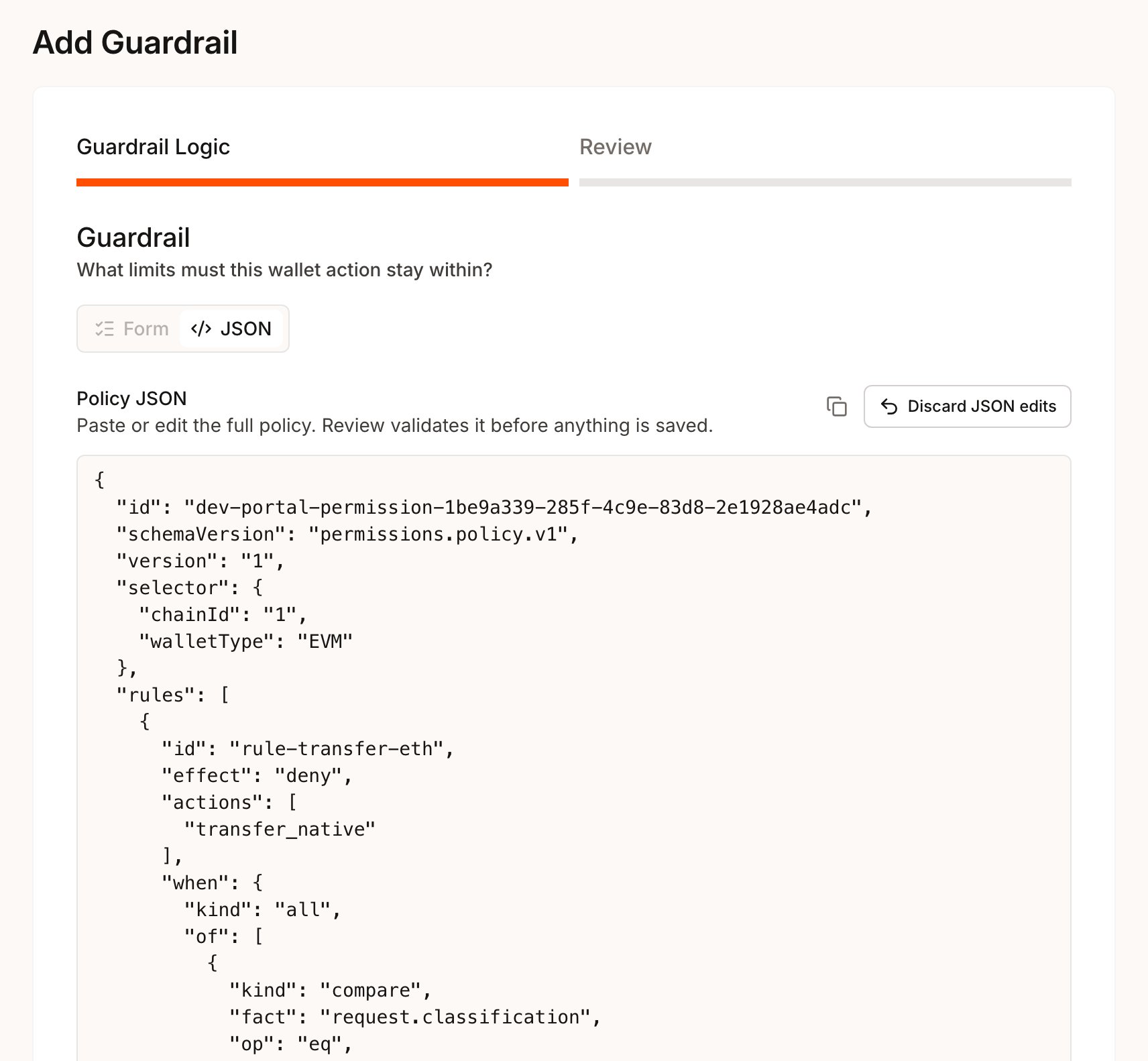 Select **Review**. The Portal checks the JSON locally, then Para validates the policy. Errors appear under **The draft needs attention**, most with the JSON path they apply to, such as `$.rules[0].when`. A valid policy moves to the Review step in its normalized form.
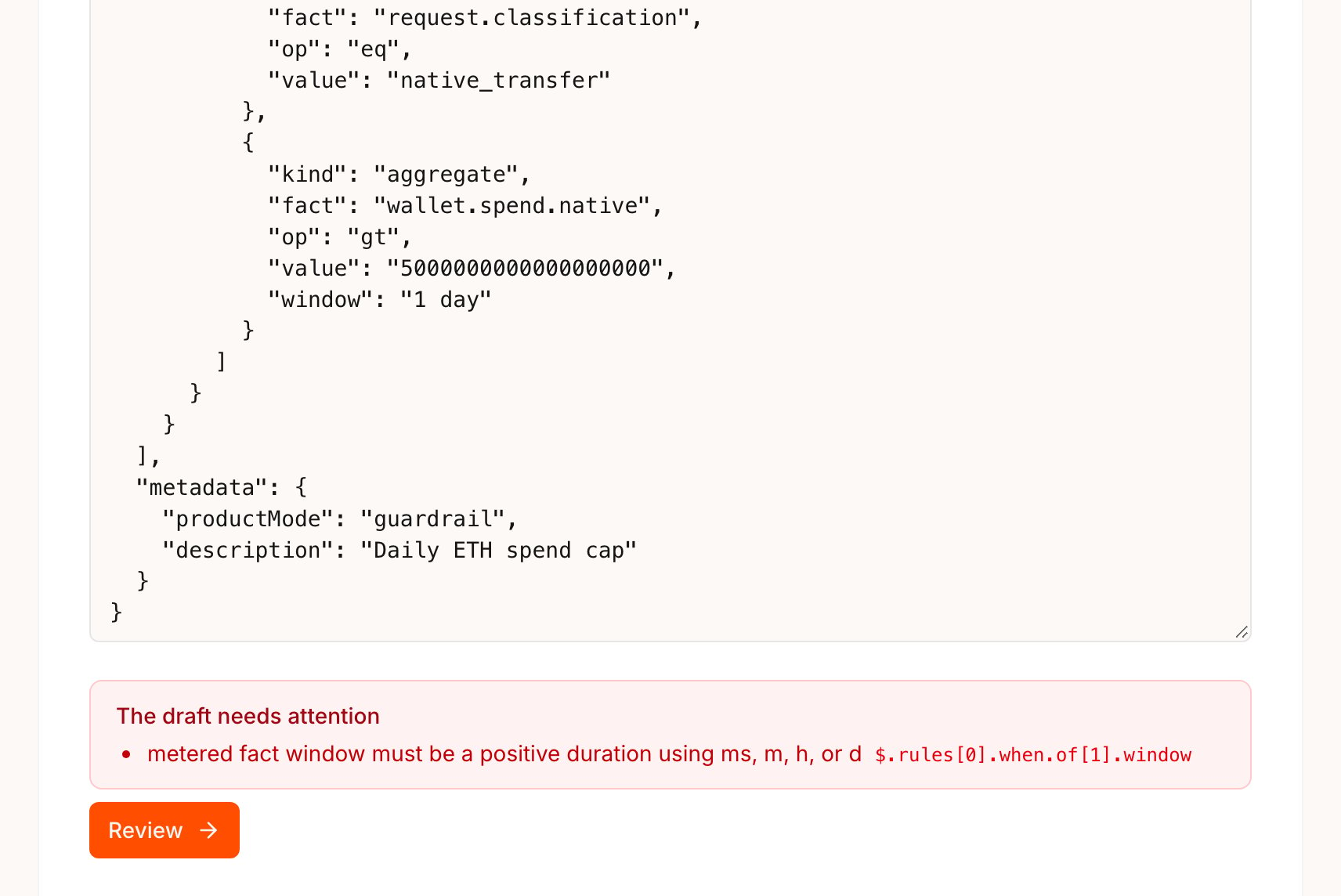 For a new policy, select **Save Draft**, then select **Activate** on the draft row. When you edit an active policy, **Save changes** replaces it with the next version at once, so there is no draft to activate. If saving or activating would invalidate open approval cases, the Portal asks first, the same way it does for form edits. Nothing in the policy JSON controls this.
When you edit an existing policy, the editor loads it with the next `version` already set. Keep `id`, `selector` and `metadata.productMode` unchanged, because Para rejects an edit that changes them. A different selector is a separate policy.
## Submit JSON with the CLI
The CLI suits policies you keep in source control or apply from scripts. Writes are limited to beta keys, so pass `--environment beta`.
```bash theme={null}
para keys permissions validate KEY_ID --file policy.json --environment beta
para keys permissions create KEY_ID --file policy.json --environment beta
para keys permissions activate RECORD_ID KEY_ID --environment beta
```
`validate` prints one line per error with its path, message and code, and exits with code `10` when the policy is invalid. `create` saves a draft and prints its record ID together with the matching `activate` command.
`replace`, `activate` and `deactivate` check whether the change would invalidate open approval cases. In a terminal, the CLI asks before it applies such a change, and with `--yes` it stops with exit code `10`, as the policy lifecycle page in this section describes. Add `--force` to apply the change and invalidate those cases.
```bash theme={null}
para keys permissions replace RECORD_ID KEY_ID --file policy.json --environment beta --yes --force
```
## The shape of a policy
Every policy is one JSON object with the same top-level fields. Rules hold the logic, and the selector decides which wallets the policy covers.
| Field | What it holds |
| - | - |
| `id` | Your name for the policy. It stays the same across versions and cannot start with `para-`. |
| `schemaVersion` | Always `"permissions.policy.v1"`. |
| `version` | A string. Start at `"1"`; each edit uses the next integer. |
| `selector` | `walletType` (`EVM`, `SOLANA`, `COSMOS`, `STELLAR` or `SUI`), plus optional `chainId`, `walletId` or `userId` to narrow it. Omit `chainId` to cover every network of the wallet type. |
| `rules` | One or more rules. Each has an `id`, an `effect`, the `actions` it governs and a `when` condition. |
| `metadata` | `productMode` (`"guardrail"`, or `"delegation"` for a Request) and `description`. The description names the policy in the Developer Portal. On a Request, it is also the text users read on the consent screen. |
Each rule's `effect` says what happens when its condition matches. When several rules match one request, the strongest effect wins: `deny`, then `require_approval`, then `allow`.
| Effect | In a Guardrail | In a Request |
| - | - | - |
| `deny` | Blocks matching requests | Not allowed |
| `require_approval` | Holds matching requests for approval | Allowed with an `approvalRequirement` |
| `allow` | Not needed, because app-owned wallets sign by default. Validation accepts it only with exactly `"actions": ["raw_signature"]` | Grants standing access once the user consents |
A `when` condition is a `compare` on one fact, an `aggregate` that meters spend over a `window` such as `"24h"` or `"1d"`, or a group: `all`, `any` or `not`. These two examples cover native transfers on Sepolia.
This Guardrail blocks native transfers to anyone outside two known addresses, and blocks any transfer that would take the wallet's spend above 1 ETH in a day.
```json ops-wallet-transfers.json theme={null}
{
"id": "ops-wallet-transfers",
"schemaVersion": "permissions.policy.v1",
"version": "1",
"selector": {
"walletType": "EVM",
"chainId": "11155111"
},
"rules": [
{
"id": "block-unknown-or-large-transfers",
"effect": "deny",
"actions": ["transfer_native"],
"when": {
"kind": "any",
"of": [
{
"kind": "not",
"of": {
"kind": "compare",
"fact": "request.to",
"op": "in",
"value": [
"0x1111111111111111111111111111111111111111",
"0x2222222222222222222222222222222222222222"
]
}
},
{
"kind": "aggregate",
"fact": "wallet.spend.native",
"op": "gt",
"value": "1000000000000000000",
"window": "1d"
}
]
}
}
],
"metadata": {
"productMode": "guardrail",
"description": "Ops wallet transfers on Sepolia"
}
}
```
This Request asks users for standing access to native transfers of up to 0.05 ETH each and 0.2 ETH a day. Transfers outside it do not get standing access from this policy.
```json daily-eth-allowance.json theme={null}
{
"id": "daily-eth-allowance",
"schemaVersion": "permissions.policy.v1",
"version": "1",
"selector": {
"walletType": "EVM",
"chainId": "11155111"
},
"rules": [
{
"id": "small-transfers-daily-cap",
"effect": "allow",
"actions": ["transfer_native"],
"when": {
"kind": "all",
"of": [
{
"kind": "compare",
"fact": "request.value.baseUnits",
"op": "lte",
"value": "50000000000000000"
},
{
"kind": "aggregate",
"fact": "wallet.spend.native",
"op": "lte",
"value": "200000000000000000",
"window": "1d"
}
]
}
}
],
"metadata": {
"productMode": "delegation",
"description": "send up to 0.05 ETH at a time and 0.2 ETH a day"
}
}
```
Amounts are strings of digits in the asset's base units, so 1 ETH is `"1000000000000000000"` wei. A JSON number fails validation. The `in` operator takes an array of values.
When a rule reads a fact that Para cannot read for a request, the rule cannot decide. Para then denies the request with a reason such as `missing-fact`, unless another matching rule with an equal or stronger effect decides it. It does not fall back to Para's defaults. Facts that depend on decoding, such as a contract's method and arguments, are not always available, so test the requests your app sends.
`"actions": "all"` covers every action of the wallet type, `raw_signature` included, but the validation fact check leaves `raw_signature` out. An `"all"` rule can therefore read only `request.classification`, the `para.wallet.*` facts and, on Solana, Cosmos, Stellar and Sui, `request.actionFamilies`. A raw signature has no `request.actionFamilies`, so a condition on it is indeterminate on a raw signature unless another condition in its group settles it, and Para then denies the raw signature unless another matching rule has the same or a stronger effect. See [Facts Para cannot read](/v3/references/permissions/policy-json#facts-para-cannot-read).
An `"all"` rule that reads any other request fact fails validation with `fact_action_unsupported`, because some actions, such as message signing, provide only `request.classification`. List the actions the rule needs instead.
Approval requirements and adjustable parameters are enabled per key. Until Para enables them for your key, validating, saving or activating a policy that uses them returns the field error `permissions_v2_extension_unavailable`.
## Look up the language
The Reference lists every fact, operator and value a policy can use, so you can build a valid policy from it.
This documentation is built and hosted on [Mintlify](https://mintlify.com), a developer documentation platform.
For a new policy, select **Save Draft**, then select **Activate** on the draft row. When you edit an active policy, **Save changes** replaces it with the next version at once, so there is no draft to activate. If saving or activating would invalidate open approval cases, the Portal asks first, the same way it does for form edits. Nothing in the policy JSON controls this.
When you edit an existing policy, the editor loads it with the next `version` already set. Keep `id`, `selector` and `metadata.productMode` unchanged, because Para rejects an edit that changes them. A different selector is a separate policy.
## Submit JSON with the CLI
The CLI suits policies you keep in source control or apply from scripts. Writes are limited to beta keys, so pass `--environment beta`.
```bash theme={null}
para keys permissions validate KEY_ID --file policy.json --environment beta
para keys permissions create KEY_ID --file policy.json --environment beta
para keys permissions activate RECORD_ID KEY_ID --environment beta
```
`validate` prints one line per error with its path, message and code, and exits with code `10` when the policy is invalid. `create` saves a draft and prints its record ID together with the matching `activate` command.
`replace`, `activate` and `deactivate` check whether the change would invalidate open approval cases. In a terminal, the CLI asks before it applies such a change, and with `--yes` it stops with exit code `10`, as the policy lifecycle page in this section describes. Add `--force` to apply the change and invalidate those cases.
```bash theme={null}
para keys permissions replace RECORD_ID KEY_ID --file policy.json --environment beta --yes --force
```
## The shape of a policy
Every policy is one JSON object with the same top-level fields. Rules hold the logic, and the selector decides which wallets the policy covers.
| Field | What it holds |
| - | - |
| `id` | Your name for the policy. It stays the same across versions and cannot start with `para-`. |
| `schemaVersion` | Always `"permissions.policy.v1"`. |
| `version` | A string. Start at `"1"`; each edit uses the next integer. |
| `selector` | `walletType` (`EVM`, `SOLANA`, `COSMOS`, `STELLAR` or `SUI`), plus optional `chainId`, `walletId` or `userId` to narrow it. Omit `chainId` to cover every network of the wallet type. |
| `rules` | One or more rules. Each has an `id`, an `effect`, the `actions` it governs and a `when` condition. |
| `metadata` | `productMode` (`"guardrail"`, or `"delegation"` for a Request) and `description`. The description names the policy in the Developer Portal. On a Request, it is also the text users read on the consent screen. |
Each rule's `effect` says what happens when its condition matches. When several rules match one request, the strongest effect wins: `deny`, then `require_approval`, then `allow`.
| Effect | In a Guardrail | In a Request |
| - | - | - |
| `deny` | Blocks matching requests | Not allowed |
| `require_approval` | Holds matching requests for approval | Allowed with an `approvalRequirement` |
| `allow` | Not needed, because app-owned wallets sign by default. Validation accepts it only with exactly `"actions": ["raw_signature"]` | Grants standing access once the user consents |
A `when` condition is a `compare` on one fact, an `aggregate` that meters spend over a `window` such as `"24h"` or `"1d"`, or a group: `all`, `any` or `not`. These two examples cover native transfers on Sepolia.
This Guardrail blocks native transfers to anyone outside two known addresses, and blocks any transfer that would take the wallet's spend above 1 ETH in a day.
```json ops-wallet-transfers.json theme={null}
{
"id": "ops-wallet-transfers",
"schemaVersion": "permissions.policy.v1",
"version": "1",
"selector": {
"walletType": "EVM",
"chainId": "11155111"
},
"rules": [
{
"id": "block-unknown-or-large-transfers",
"effect": "deny",
"actions": ["transfer_native"],
"when": {
"kind": "any",
"of": [
{
"kind": "not",
"of": {
"kind": "compare",
"fact": "request.to",
"op": "in",
"value": [
"0x1111111111111111111111111111111111111111",
"0x2222222222222222222222222222222222222222"
]
}
},
{
"kind": "aggregate",
"fact": "wallet.spend.native",
"op": "gt",
"value": "1000000000000000000",
"window": "1d"
}
]
}
}
],
"metadata": {
"productMode": "guardrail",
"description": "Ops wallet transfers on Sepolia"
}
}
```
This Request asks users for standing access to native transfers of up to 0.05 ETH each and 0.2 ETH a day. Transfers outside it do not get standing access from this policy.
```json daily-eth-allowance.json theme={null}
{
"id": "daily-eth-allowance",
"schemaVersion": "permissions.policy.v1",
"version": "1",
"selector": {
"walletType": "EVM",
"chainId": "11155111"
},
"rules": [
{
"id": "small-transfers-daily-cap",
"effect": "allow",
"actions": ["transfer_native"],
"when": {
"kind": "all",
"of": [
{
"kind": "compare",
"fact": "request.value.baseUnits",
"op": "lte",
"value": "50000000000000000"
},
{
"kind": "aggregate",
"fact": "wallet.spend.native",
"op": "lte",
"value": "200000000000000000",
"window": "1d"
}
]
}
}
],
"metadata": {
"productMode": "delegation",
"description": "send up to 0.05 ETH at a time and 0.2 ETH a day"
}
}
```
Amounts are strings of digits in the asset's base units, so 1 ETH is `"1000000000000000000"` wei. A JSON number fails validation. The `in` operator takes an array of values.
When a rule reads a fact that Para cannot read for a request, the rule cannot decide. Para then denies the request with a reason such as `missing-fact`, unless another matching rule with an equal or stronger effect decides it. It does not fall back to Para's defaults. Facts that depend on decoding, such as a contract's method and arguments, are not always available, so test the requests your app sends.
`"actions": "all"` covers every action of the wallet type, `raw_signature` included, but the validation fact check leaves `raw_signature` out. An `"all"` rule can therefore read only `request.classification`, the `para.wallet.*` facts and, on Solana, Cosmos, Stellar and Sui, `request.actionFamilies`. A raw signature has no `request.actionFamilies`, so a condition on it is indeterminate on a raw signature unless another condition in its group settles it, and Para then denies the raw signature unless another matching rule has the same or a stronger effect. See [Facts Para cannot read](/v3/references/permissions/policy-json#facts-para-cannot-read).
An `"all"` rule that reads any other request fact fails validation with `fact_action_unsupported`, because some actions, such as message signing, provide only `request.classification`. List the actions the rule needs instead.
Approval requirements and adjustable parameters are enabled per key. Until Para enables them for your key, validating, saving or activating a policy that uses them returns the field error `permissions_v2_extension_unavailable`.
## Look up the language
The Reference lists every fact, operator and value a policy can use, so you can build a valid policy from it.
This documentation is built and hosted on [Mintlify](https://mintlify.com), a developer documentation platform. 
