> ## Documentation Index
> Fetch the complete documentation index at: https://docs.getpara.com/llms.txt
> Use this file to discover all available pages before exploring further.
# Go to production
> Request a production review, publish your Guardrails and roll out later changes
export const PermissionsCards = ({basePath, pages, cols = 2, horizontal = false}) => {
const ImageCard = Card;
const hrefOverrides = {
"/v3/react/guides/permissions": {
"conditional-approvals": "/v3/react/guides/conditional-approvals"
},
"/v3/rest/permissions": {
"backend": "/v3/rest/permissions-administration"
}
};
const guardrailBases = ["/v3/rest/permissions", "/v3/server/guides/permissions"];
const ownership = guardrailBases.includes(basePath) ? 'guardrail' : 'request';
const overviewImages = {
"/v3/rest/permissions": {
"imgUrl": "/images/v3/cards/rest-guardrails.png",
"horizontalImgUrl": "/images/v3/cards/rest-guardrails-horizontal.png"
},
"/v3/server/guides/permissions": {
"imgUrl": "/images/v3/cards/sdk-server-guardrail-signing.png",
"horizontalImgUrl": "/images/v3/cards/sdk-server-guardrail-signing-horizontal.png"
},
"/v3/react/guides/permissions": {
"imgUrl": "/images/v3/cards/sdk-get-policy-consent-url.png",
"horizontalImgUrl": "/images/v3/cards/sdk-get-policy-consent-url-horizontal.png"
},
"/v3/react-native/guides/permissions": {
"imgUrl": "/images/v3/cards/sdk-get-policy-consent-url.png",
"horizontalImgUrl": "/images/v3/cards/sdk-get-policy-consent-url-horizontal.png"
}
};
const registry = {
overview: {
title: "Permissions overview",
description: "Return to the start of the Permissions path.",
...overviewImages[basePath]
},
"developer-portal": {
title: "Create policies in the Developer Portal",
description: "Build a policy with the Portal forms and activate it on a beta key.",
imgUrl: "/images/v3/cards/developer-portal-policy-form.png",
horizontalImgUrl: "/images/v3/cards/developer-portal-policy-form-horizontal.png"
},
"json": {
title: "Write policy JSON",
description: "Move to JSON for policies the forms cannot express.",
imgUrl: "/images/v3/cards/developer-portal-policy-json.png",
horizontalImgUrl: "/images/v3/cards/developer-portal-policy-json-horizontal.png"
},
"testing": {
title: "Test your policies",
description: "Exercise every rule on beta before you ship.",
imgUrl: "/images/v3/cards/concept-policy-testing.png",
horizontalImgUrl: "/images/v3/cards/concept-policy-testing-horizontal.png"
},
"production": {
title: "Go to production",
description: "Request a production review and publish your policy.",
imgUrl: "/images/v3/cards/concept-policy-publication.png",
horizontalImgUrl: "/images/v3/cards/concept-policy-publication-horizontal.png"
},
"conditional-approvals": {
title: "Conditional approvals",
description: "Require people to approve a request before it signs.",
imgUrl: "/images/v3/cards/portal-conditional-approval-case.png",
horizontalImgUrl: "/images/v3/cards/portal-conditional-approval-case-horizontal.png"
},
"approval-signatures": {
title: "Collect approval signatures",
description: "Collect signatures from approvers for multisig workflows.",
imgUrl: "/images/v3/cards/sdk-get-approval-signatures.png",
horizontalImgUrl: "/images/v3/cards/sdk-get-approval-signatures-horizontal.png"
},
"adjustable-parameters": {
title: "Adjustable parameters",
description: "Let users set their own limits and managers adjust approval settings.",
imgUrl: "/images/v3/cards/portal-user-policy-limits.png",
horizontalImgUrl: "/images/v3/cards/portal-user-policy-limits-horizontal.png"
},
"lifecycle": {
title: "Manage the policy lifecycle",
description: "Version, activate, replace and retire policies.",
imgUrl: "/images/v3/cards/developer-portal-policy-versions.png",
horizontalImgUrl: "/images/v3/cards/developer-portal-policy-versions-horizontal.png"
},
"backend": {
title: "Manage permissions from your backend",
description: "Assign approvers and read policy state with your server secret.",
imgUrl: "/images/v3/cards/rest-permissions-administration.png",
horizontalImgUrl: "/images/v3/cards/rest-permissions-administration-horizontal.png"
},
templates: ownership === "guardrail" ? {
title: "Guardrail templates",
description: "Start from a tested Guardrail policy.",
imgUrl: "/images/v3/cards/concept-guardrail-templates.png",
horizontalImgUrl: "/images/v3/cards/concept-guardrail-templates-horizontal.png"
} : {
title: "Request templates",
description: "Start from a tested Request policy.",
imgUrl: "/images/v3/cards/concept-request-templates.png",
horizontalImgUrl: "/images/v3/cards/concept-request-templates-horizontal.png"
},
"guardrail:templates/spending-caps": {
title: "Spending caps",
description: "Cap native and token transfers per transaction or per day.",
imgUrl: "/images/v3/cards/concept-spending-limits.png",
horizontalImgUrl: "/images/v3/cards/concept-spending-limits-horizontal.png"
},
"guardrail:templates/allowlists": {
title: "Recipient and contract allowlists",
description: "Limit transfers and contract calls to addresses you know.",
imgUrl: "/images/v3/cards/concept-recipient-allowlists.png",
horizontalImgUrl: "/images/v3/cards/concept-recipient-allowlists-horizontal.png"
},
"guardrail:templates/approval-tiers": {
title: "Approval thresholds and tiers",
description: "Hold large transfers for approval, or deny the largest.",
imgUrl: "/images/v3/cards/concept-approval-tiers.png",
horizontalImgUrl: "/images/v3/cards/concept-approval-tiers-horizontal.png"
},
"guardrail:templates/treasury": {
title: "Treasury approvals",
description: "Deny unplanned actions and approve wallet or Safe payouts in stages.",
imgUrl: "/images/v3/cards/concept-treasury-approvals.png",
horizontalImgUrl: "/images/v3/cards/concept-treasury-approvals-horizontal.png"
},
"guardrail:templates/message-signing": {
title: "Message and raw signing",
description: "Block or hold raw signatures, and block permits.",
imgUrl: "/images/v3/cards/concept-signing-actions.png",
horizontalImgUrl: "/images/v3/cards/concept-signing-actions-horizontal.png"
},
"request:templates/allowances": {
title: "Transfer allowances",
description: "Let small transfers and a daily budget sign without a prompt.",
imgUrl: "/images/v3/cards/concept-spending-limits.png",
horizontalImgUrl: "/images/v3/cards/concept-spending-limits-horizontal.png"
},
"request:templates/recipients-and-contracts": {
title: "Known recipients and app contracts",
description: "Cover transfers to known addresses and your contract's calls.",
imgUrl: "/images/v3/cards/concept-recipient-allowlists.png",
horizontalImgUrl: "/images/v3/cards/concept-recipient-allowlists-horizontal.png"
},
"request:templates/cosigner-approval": {
title: "Co-signer approval",
description: "Send large transfers to a co-signer for approval.",
imgUrl: "/images/v3/cards/portal-conditional-approval-case.png",
horizontalImgUrl: "/images/v3/cards/portal-conditional-approval-case-horizontal.png"
},
"request:templates/adjustable-limits": {
title: "User-adjustable limits",
description: "Let each user choose their own spending limits.",
imgUrl: "/images/v3/cards/portal-user-policy-limits.png",
horizontalImgUrl: "/images/v3/cards/portal-user-policy-limits-horizontal.png"
},
"request:templates/message-signing": {
title: "Message signing",
description: "Sign messages from users' wallets without a prompt.",
imgUrl: "/images/v3/cards/concept-signing-actions.png",
horizontalImgUrl: "/images/v3/cards/concept-signing-actions-horizontal.png"
}
};
const entryFor = slug => registry[slug] || registry[`${ownership}:${slug}`];
const hrefFor = slug => {
if (slug === 'overview') return basePath;
const overrides = hrefOverrides[basePath] || ({});
return overrides[slug] || `${basePath}/${slug}`;
};
return
{pages.map(slug => {
const entry = entryFor(slug);
return ;
})}
;
};
Production Guardrails apply to the pregenerated wallets your server signs with on its production API key.
Para publishes production policies after reviewing the policy you tested on beta. This page covers what to finish before you ask, how to request the review, how later changes reach production and what users notice when a policy changes.
## Beta and production are separate
Each API key has its own policies, and beta and production are separate environments. Creating a production key copies nothing from your Development key. Until Para publishes a policy to it, the production key keeps its current signing behavior.
| | Development key (beta) | Production key |
| - | - | - |
| Who writes policies | You, in the Developer Portal or with the CLI | Para, after a production review |
| Developer Portal | Create, edit, activate, turn off and delete | Read-only: view policies and their JSON |
| CLI | `validate`, `create`, `replace`, `activate`, `deactivate` and `archive` | Policy changes are refused |
| Users, approver roles and wallet scopes | Beta users and the beta secret key | Production users and the production secret key |
## Finish on beta first
The review starts from the policy that is active on your Development key. Before you request it:
1. Run your full test matrix against the version you want to ship.
2. Keep that version active on a Development key in the same project as the production key. The review can only be requested while one is active.
3. Tell Para which values differ in production, such as chain IDs, token contracts, recipients and Safe addresses. Para already has the beta policy and copies it after review with the production values you confirm.
4. Check the features the policy uses. Approval requirements and adjustable parameters are enabled per key, so confirm with Para that the production key will have them.
5. If the policy uses approvals, prepare your production backend: assign approver roles and bind wallets to authorization scopes again with the production secret key, because beta assignments do not carry over.
## Request production review
The review request lives on the production key in the Developer Portal. It tells Para which project and keys to review; it does not copy anything by itself.
In the key switcher, select your **Production** key. While Permissions is off for that key and a Development key in the same project has an active policy, a banner across the top of the key's pages asks you to request a review.
Select **Request production review**. The button changes to **Review requested** and a **Production review requested.** message confirms it. The button remembers this only for the current browser session, and the banner stays until Para turns Permissions on for the key.
Para reviews your active beta policy and copies the approved policy to the production key with its production values. Publishing turns Permissions on for that key.
Open **Permissions** on the production key, expand each policy and compare its **Normalized policy JSON** with the policy you tested.
If the request fails with "Production review is not available yet", check that a Development key in the same project has an active policy and that Permissions is still off on the production key. If it fails to deliver, select the button again.
## Change a production policy
The banner appears only while Permissions is off for the production key, so later changes go through Para directly. Changing, turning off or deleting a beta policy never changes production.
1. Make the change on your Development key and rerun the tests it affects.
2. Contact [Para support](mailto:support@getpara.com) to review the new version and publish it to the production key.
3. Verify the published version on the production key.
## What users notice after a change
A published change applies to the next signing request on the production key. What users see depends on the policy type.
No one is asked to consent. The new version starts deciding requests as soon as it is published.
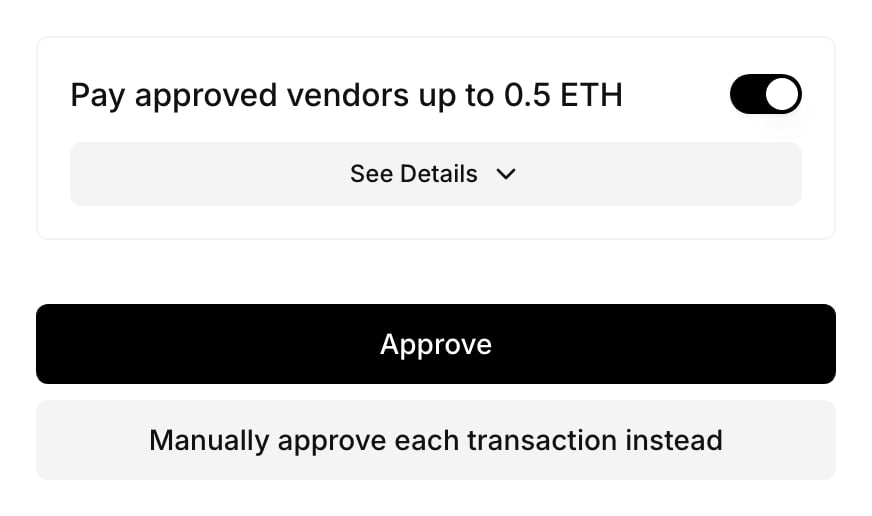
Consent belongs to one policy version, so a new version starts with no consent from anyone. When a user's next matching transaction goes to review, the Portal shows the consent screen again with the same layout and copy as a first request. Nothing on the screen says the policy changed, so tell users in your app when a change matters to them.
To ask ahead of time, build a consent link with `getPolicyConsentUrl({ walletId, policyId })` and open it for the user.
Users who saved personal limits must confirm them for the new version. Until they do, their settings report `needs_confirmation`.
 An approval case that has not been used to sign is invalidated when the active policies that apply to its request change, for example when a policy is replaced, activated or turned off. An invalidated case cannot complete, so start a new request to open a new case.
This documentation is built and hosted on [Mintlify](https://mintlify.com), a developer documentation platform.
An approval case that has not been used to sign is invalidated when the active policies that apply to its request change, for example when a policy is replaced, activated or turned off. An invalidated case cannot complete, so start a new request to open a new case.
This documentation is built and hosted on [Mintlify](https://mintlify.com), a developer documentation platform.