

Configure Webhooks
Set up webhooks from your API key’s Webhooks page in the .Set Your Endpoint URL
Enable the webhook toggle and enter your HTTPS endpoint URL. Para will send POST requests to this URL when subscribed events occur.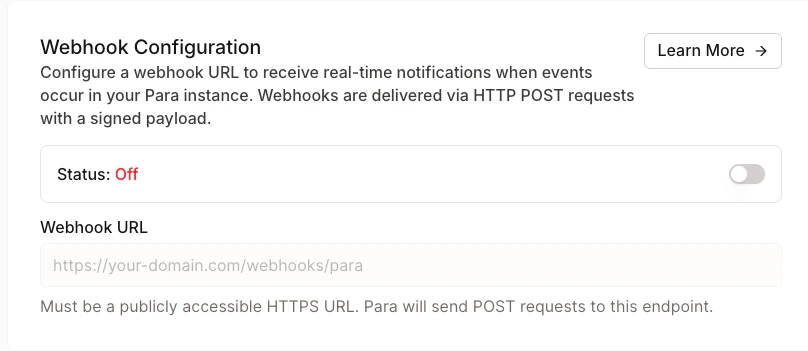
Select Events
Choose which events you want to receive. You must select at least one event type when webhooks are enabled.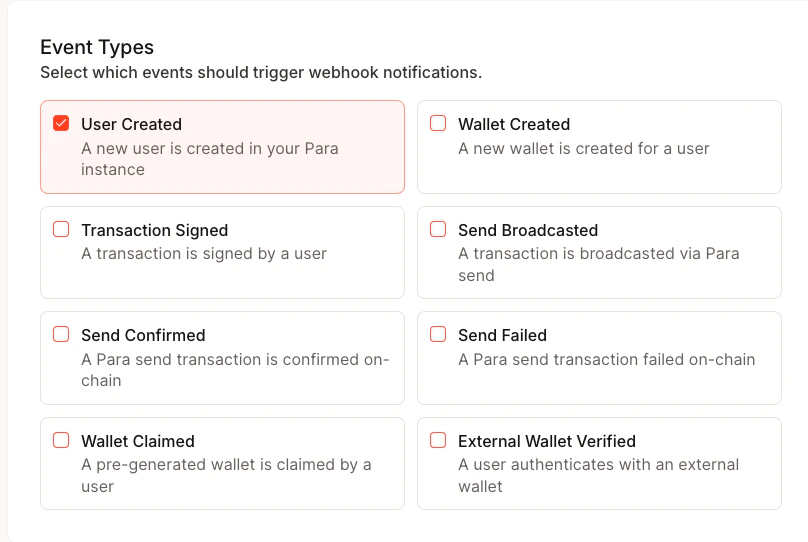
Save and Copy Your Secret
When you first save your webhook configuration, Para generates a signing secret (prefixed withwhsec_). This secret is
displayed only once — copy and store it securely. You’ll use it to
verify webhook signatures.
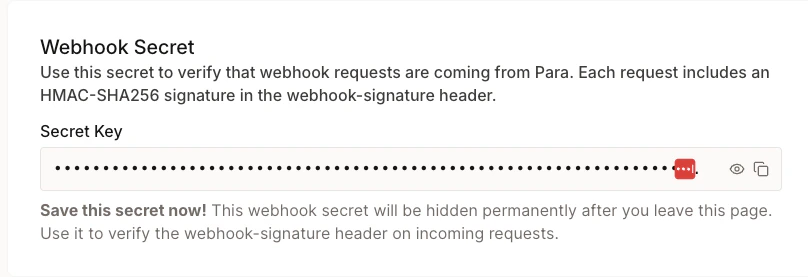
Your webhook secret is shown only at creation and after rotation. If you lose it, you’ll need to rotate to get a new
one.
Test Your Endpoint
Click Test Webhook to send atest.ping event to your endpoint. This verifies connectivity without triggering a
real event.
Event Types
Event Payload
Every webhook request contains a JSON body with a standard envelope wrapping the event-specific data:Event Data by Type
user.created
user.created
wallet.created
wallet.created
transaction.signed
transaction.signed
chainId field is null for message signing operations where no chain is involved.send.broadcasted
send.broadcasted
type will be "SOLANA" and evmChainId will be absent. isDevnet indicates if the transaction was on a devnet.send.confirmed
send.confirmed
send.failed
send.failed
error field is optional and may be absent if no error message was available.rest.transaction.confirmed
rest.transaction.confirmed
transactionId matches the id returned from POST /v1/wallets/:walletId/transfer or
POST /v1/wallets/:walletId/sign-transaction with broadcast: true and used
by GET /v1/wallets/:walletId/transactions/:transactionId.
intentKind is transfer, sign_transaction, or yield. For yield, each event describes one approval or Aave transaction; check the yield operation for the overall result.
Legacy EVM transfer and signing broadcasts resolve only after canonical receipt and finalized-block checks.
Solana broadcasts require finalized signature status. A confirmation may arrive after the active monitoring window ends.rest.transaction.failed
rest.transaction.failed
status is reverted (verified execution failure on-chain) or failed (signing/broadcast failure or an identified
same-nonce winner). failureStage identifies signing/broadcast failures; failureCode may be REPLACED or
CANCELLED for a superseded original transaction. Reconciliation payloads may include chainOutcome
(success, revert, replacement, or cancellation), winningHash, and winningStatus (confirmed or reverted).
The payload’s hash remains the original transaction hash.Active monitoring timeout alone emits no failed event. A broadcast RPC timeout can still emit failed;
reconcile the original transaction before retrying a payment, as described in Failure Fields.
Older monitor_timeout events do not prove chain failure; fetch the
current transaction record before applying a delayed event. Delivery is at least
once; deduplicate retries using the stable webhook-id header.wallet.pregen_claimed
wallet.pregen_claimed
user.external_wallet_verified
user.external_wallet_verified
walletProvider field is optional and may be absent depending on how the wallet was connected.onramp.completed
onramp.completed
purchaseId is the same id the SDK reports on the
ONRAMP_LAUNCHED event, so you can correlate the event with the launch.transactionHash is null when the provider settled without reporting an on-chain hash. walletId is absent
when the destination was a raw external address rather than a Para wallet. The asset fields are best-effort —
an empty object means the delivered token could not be resolved against the catalog.Check testMode before recording the purchase in production accounting: test purchases run a real quote but are
never charged, and they emit this event exactly like live ones.TypeScript Types
If your handler is written in TypeScript,@getpara/rest-sdk (3.20+) exports types for every event above, so you don’t have to restate those shapes by hand. Use ParaWebhookEvent rather than the generic WebhookEvent — it’s a discriminated union, so a switch on event.type narrows event.data to that event’s payload:
WalletCreatedPayload, OnrampCompletedPayload, …) and ParaWebhookPayload<K> are exported too, for typing a single-event handler. These are types only — verifying the signature is still your handler’s job, as described below.
Verify Webhook Signatures
Every webhook request includes headers that let you verify the request came from Para:
To verify a webhook:
- Construct the signed message:
{webhook-timestamp}.{raw request body} - Compute
HMAC-SHA256using your webhook secret as the key - Base64-encode the result and compare it to the signature after the
v1,prefix
Manage Your Webhook
Rotate Secret
If your secret is compromised or you need a new one, rotate it from the Danger Zone section of the Webhooks page. The previous secret remains valid for 24 hours to give you time to update your server. A new secret is displayed once.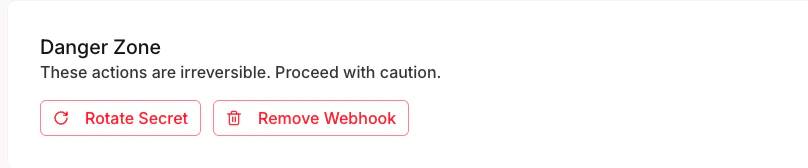
Disable or Delete
Toggle webhooks off to temporarily stop delivery without losing your configuration. To remove the webhook entirely, use the Delete Webhook button — this removes the URL, events, and secret permanently.Best Practices
- Respond quickly: Return a
2xxstatus within a few seconds. Offload heavy processing to a background job. - Verify signatures: Always validate the
webhook-signatureheader before trusting the payload. - Check timestamps: Reject webhooks with timestamps more than 5 minutes old to prevent replay attacks.
- Handle duplicates: Use the
webhook-idheader to deduplicate events in case of retries. - Use HTTPS: Your endpoint must be HTTPS. Para rejects HTTP URLs.